Structure

A plan of every page and its one job, what each kind of page must hold, true words for it, and a gray sketch of the order it’s read in.

0 / 7 complete

Starts with
The brief, Claims list, Search plan
Produces
Sitemap, Content model, Manuscript, Wireframe
Feeds into
Design

Production Checklist

  1. Video, 1:20 Introduction to Structure Introduction
  2. Video, 3:44 Plan the pages, one job each Makes: Site plan
  3. Video, 3:42 Define page types and their slots Makes: Content model
  4. Video, 1:48 Turn the visitor’s questions into the homepage’s sections Makes: Homepage sections
  5. Video, 1:17 List what every slot needs before design Makes: Asset list
  6. Video, 3:32 Write true copy for each slot Makes: Site copy
  7. Video, 3:37 Localize with explicit uncertainty Optional
  8. Video, 2:44 Wireframe a page for hierarchy Makes: Wireframe

Localize with explicit uncertainty

Translate with AI and mark exactly where it needs checking.

More

Full transcript

AI will translate a whole site in seconds, and the result will look fluent in a language you can't read. That's the danger: from the outside, a good translation and a wrong one look exactly the same.

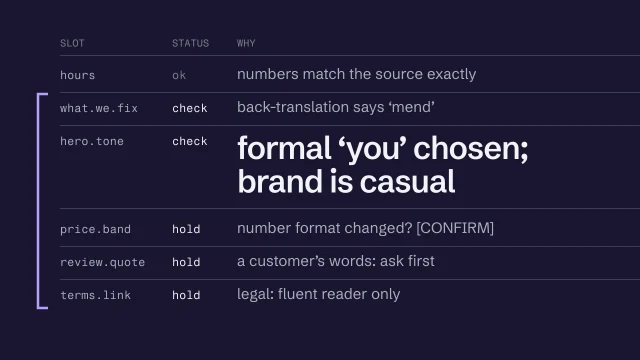
So use it, and expect some lines to be wrong. A wrong price, a formal 'you' where the brand is casual, a customer's quote quietly rewritten: none of it looks wrong to someone who doesn't speak the language. Your job is to translate, then show exactly which lines you're unsure about, so the person who can read them knows where to look.

Translate from the finished manuscript, never from the built page, and keep the slot names so every translated line sits next to its source. The bakery launches in English: the owner settled on one language on the ninth of October. Say she adds Albanian later, for neighbors who speak it at home. Give the AI the content model, the manuscript and a glossary of what stays as it is, like the bakery's name and the loaf names. Every line gets a status as it's produced: ok, check or hold. The customer glossary doesn't carry over, because it came from English reviews. What Albanian speakers call the sourdough is a question for a fluent reader, so those lines start at check.

Some lines need marking more than others. Numbers first. Prices, hours and phone numbers should come through exactly, though a time or number format may need to change for the reader: here, six p.m. became eighteen hundred. Many languages make you choose between a formal and an informal 'you', and the AI will pick one without telling you. Translating a customer's review changes their words, so show the original beside it, or ask. Anything legal or about safety is held for a fluent check, every time: on a bakery's site, that's the allergens. And translations rarely come out the same length, so check each line still fits its slot.

This is the sheet that goes with the translation: every slot, a status, and a reason someone can act on. Check means I've found something I can't settle myself, like a button that translates back as 'order forward' instead of 'order ahead'. Hold means it doesn't publish until someone fluent has signed it off. A reviewer who gets this sheet goes straight to the lines that matter, instead of reading the whole site and hoping to notice.

You can verify more than you'd think without speaking the language. Check every number against the source, and check the glossary terms survived. Translate it back with a different translation service and compare the meaning. That catches drift, though not whether a line sounds natural. And make sure the page declares its language in the code, lang equals s q for Albanian, so screen readers pronounce it. W3C's guidance on declaring language in HTML shows how. What you can't verify is whether it reads like a person wrote it, whether the tone is right, and whether the legal lines say what they should.

So someone fluent checks it before it's published for real: the client or a native speaker, planned for from the start. You don't need to speak the language to do this work, but you do need that person. A review build can carry the marked draft, so they see it in place. A published page can't. Before launch the sheet has no check or hold left on it. If a line never gets signed off, it comes out, or that page stays in the original language until it is.

A translation you can't read is a draft until someone fluent signs it off. Your job is to show them exactly where to look.

Introduction to Structure

Starts with
The brief, Claims list, Search plan
Produces
Sitemap, Content model, Manuscript, Wireframe
Feeds into
Design

Plan the pages, one job each

List every page the site needs and write its job as one sentence: who it helps, what they decide or do, and what they do next. Then walk one visitor’s path through the pages and cut any page no path reaches.

What you’ll make

Before you start
The brief and the visitor path.
You’ll learn
Giving every page a one-sentence job, labels in visitors’ words, and walking a path to cut unreached pages.
You’ll make
A site plan.
Worked example
The bakery’s site plan: wholesale is a short section on Contact, not its own page, as decided in Plan.
Used next
Content model, navigation, wireframes, Build.

My site plan

From the current site to the new one

Take every address from your harvest of the current site and decide its fate, so no old link ends on an error page.

Page 1
Page 2
Page 3
Page 4

Copy or download your answers before you leave this page.

A page with two jobs does both badly: split it, or choose. Two pages with the same job are one page.

Done when every page has a label in your visitors’ words and a one-sentence job, and one visitor’s path reaches the main action with no question left unanswered.

More

Six questions site structure answers
What pages does the site need?
A site plan lists every page and how the pages connect. Each page earns its place with one job you can say in a sentence: it helps someone decide or do one thing, then take a next step.
How will visitors find information?
Navigation is the menu and the links between pages. Name things in your visitors’ words, not your org chart’s, and keep the main task within one tap.
What belongs on each page?
A content model lists the parts each kind of page must hold. A service page needs the job, the price and what happens next. Page patterns are worked-out starting points for pages most sites need.
How should content be organized?
Hierarchy is the order people read in: what they see first, second and last. A wireframe is a gray sketch of that order, made before there are any colors or fonts to argue about.
How should the structure adapt across devices?
On a phone the same content stacks into one column. Decide what must come first and what is allowed to move, so nothing a visitor needs gets hidden behind a menu.
Can visitors complete their goals?
A journey is one visitor’s path from arriving to acting. Walk it page by page and mark every question the site leaves unanswered. It has to work with a keyboard and a screen reader too.
Common site structure mistakes

In every drawing the dashed, struck-through version is the mistake and the solid one is the fix. The drawings are illustrations.

  1. Too many choices in the menu

    Every extra item is one more word to read before a visitor can choose. Keep the top menu for the few places most visitors go, and reach the rest from the pages themselves.

  2. The thing people need, buried

    “No call-out fee” in the footer and a fee at the door. A price that decides the call belongs beside the call button.

    From The IA Library, Trades pattern

  3. Two pages doing one job

    When two pages have the same job, merge them. The common version is a page per town with only the place name swapped. Google’s spam policy names pages targeted at specific cities that funnel users to one page as doorway abuse.

    From Build a sitemap where every page has one job

  4. A page with no next step

    No next step: a dead end. Every page should end by pointing somewhere: book, call, or read the page that answers the next question.

    From Build a sitemap where every page has one job

  5. The phone menu that hides the main task

    Folding everything into a menu button saves space and costs the one thing the visitor came to do. On a phone, the main action stays on screen.

    From The IA Library, Trades pattern

  6. Organized like the company, not like the visitor

    Services organized by the firm’s departments, so a bereaved client has to know the word “probate”. Group services by the situation people are in.

    From The IA Library, Advisers pattern

  7. An order only the eye can follow

    Reading order lives in the code as well as on the screen. If the code reads in a different order from the screen, keyboard and screen-reader users get a different page. Give each page and section one element that clearly leads.

    From Wireframe for hierarchy before style

Example project files

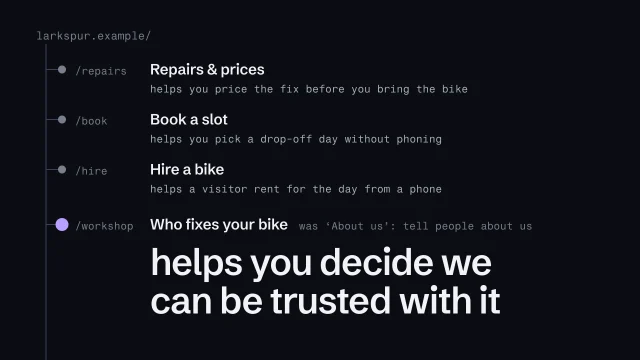
The skill’s own example, a fictional bike workshop, as a plain text file: each page’s address, its label and its job.

The job sentence
1This page helps [who]
2[decide or do what]
3so they can [next step].
4
5Today's bread helps a regular
6see what's baked today and what's left,
7so they order before it sells out.

From the skill Build a sitemap where every page has one job · fictional client

Site plan: address, label, job
1/ 'Home'
2 see the bread is baked this morning
3/bread 'Today's bread'
4 see what's left, order before it sells out
5/order 'Order ahead'
6 order loaves for pickup, skip the queue
7/visit 'Visit'
8 check the hours and the address
9/about 'About'
10 decide the bread is worth the trip
11/contact 'Contact'
12 ask a question; cafés ask about wholesale

From the skill Build a sitemap where every page has one job · fictional client

Where yours go: Organize your project, in Prepare.

Full transcript

Most sitemaps start as five words. Home, About, Services, Blog, Contact. Nobody decided on those five. They were copied from every other site in the category, and they say nothing about what this business's visitors need.

A sitemap is the set of decisions about which pages exist and why. I mean the plan of pages you design from. The XML file for search engines is a separate job. The test for every page is one question: what does a visitor come here to get done? If the answer's vague, the page will be vague, and so will everything written for it. Fixing that now costs you a line of text. Fixing it after the build means rewriting whatever sits on the page.

You don't have to start from nothing. A blueprint for a kind of site gives you a starting list. Here's one for a local food shop, which fits the bakery we've been following. But a starting list isn't a plan. Every page on it has to earn its place, with one sentence in this shape: this page helps someone decide or do something, so they can take a next step. Today's bread helps a regular see what's baked today and what's left, so they order before it sells out. That sentence commits you to a person, a decision, and the page's main action, before anyone has drawn a button.

Once every page has a sentence, read them side by side. They start arguing with each other, which is the point. Wholesale's sentence turns out to be Contact's sentence: someone with a question, here a café. Same job twice means one page, so wholesale becomes a short section on Contact. Cakes can't be ordered online at launch, so a cake page has no next step. It's cut for now.

Then name the pages. A label is a promise about what's behind it, so write it in the words visitors use. The bakery's regulars don't say products. They ask what bread there is today. So Products becomes Today's bread, and Location and hours becomes Visit. A quick test: show someone the label on its own and ask what they expect behind it. If they guess wrong, the label is wrong. And skip the clever names. Every clever label makes a visitor stop and decode it.

This is the plan I hand on, as a tree. Group the pages by what visitors are trying to do, never by how the business is organized inside. The main navigation holds what most visitors need: today's bread, ordering, the visit details, and the page for someone new. The footer repeats Visit and Contact on every page, because someone stuck on any page needs them. Each line is the address, the label and the job. It's short, and every line can be argued with.

Last, check it against the visitor journey you mapped in strategy. Take one path and walk it. A regular lands on Home, goes to Today's bread, then to Order ahead, and places her order. Then she wonders how early she can collect. On the day this plan was written, nobody knew. So it's marked as an open question, not guessed. The owner answered three days later: seven o'clock. Then walk it the other way. A page no path reaches gets cut, or folded into one that's on a path.

This matters more when an AI agent is doing the writing. Hand it a page called About and it'll produce the average About page: founded in, passionate about, committed to quality. Hand it the job sentence and it has something to aim at. The sitemap is one of the first files the agent reads, so vagueness here spreads into every page after it.

If you can't say a page's job in one sentence, it isn't a page yet. Write the sentence, then the label, then walk a visitor through it.

Tools for Structure

IA is mostly thinking on paper, so you need very little. Two references help with the parts that turn technical.

Plan for the phone first

Helps answer: How should the structure adapt across devices?

The rules about what comes first are IA's to write. Building them is Design's and Build's job, and it helps to know what's possible.

Name things the way search engines do

Helps answer: What belongs on each page?

Optional at this stage. Useful once the content model is written down.

  • Schema.org (opens in a new tab)

    schema.org · Tool

    Structured data validation.

    For Structure: Most parts of a content model already have a name here: a service, a price, opening hours, a person. Borrow the names and the developer has less to translate later.

Also for this stage

  • Hemingway Editor (opens in a new tab)

    hemingwayapp.com · Hemingway · Tool

    The quickest way to see which sentences are making a page hard to read.

  • LanguageTool (opens in a new tab)

    languagetool.org · LanguageTooler GmbH · Tool

    Open source, covers more than 30 languages, and can run on your own server instead of LanguageTool’s.

Every tool here is made by someone else. Aesthetary isn't affiliated with any of them, and listing one doesn't mean its maker endorses Aesthetary. All resources, by stage

If you own, make or teach this site
If you own or pay for the site
You decide which pages the site needs and what each one is for. Ask to see the site plan, one job per page, and have someone walk one visitor’s path through it.
If you make it
You produce the site plan, the content model and gray wireframes with real words in them. Check the reading order on a phone before anything is styled.
If you teach it or run a program
Practice writing every page’s job in one sentence. Assess a site plan by walking one visitor through it: does every page lead somewhere?
Standards Structure is checked against (9)

Aesthetary's own rules here

  • Aesthetary rule Never invent a fact; claims carry their kind; no placeholder reaches a reachable page
  • Aesthetary rule Responsive is a rule: sweep every width, fix the rule

What these are, and every standard, in Resources

How to check the plan

Read the job sentences side by side:

  • Same job twice: merge them
  • Two jobs: split, or choose
  • No visitor in it: question it
  • No next step: a dead end

Then walk a path, and the other way:

  1. Pick one path from the journey
  2. Click through it, page by page
  3. Mark each question with no answer
  4. Cut pages that no path reaches
Start from a page pattern

Patterns, the IA Library: which pages a kind of site needs and why. Six yes-or-no questions find the pattern your site starts from.

Another worked plan, for a fictional plumber: the full worked example, built from the Trades pattern. To plan the pages first, start from its blueprint.

What IA makes: a site plan

Pages and their addresses
Each page’s sections, in order, around one action
One file Design and Build read

Start from what you’re building

Plan the pages first: the six blueprints Page patterns See a test plumber’s plan, worked through Open the IA Library

On the AllWeb project

AllWeb’s strategy draft plans 16 kinds of page; the redesign built the homepage first, and the plan keeps the rest.

A speculative redesign, not commissioned by AllWeb.

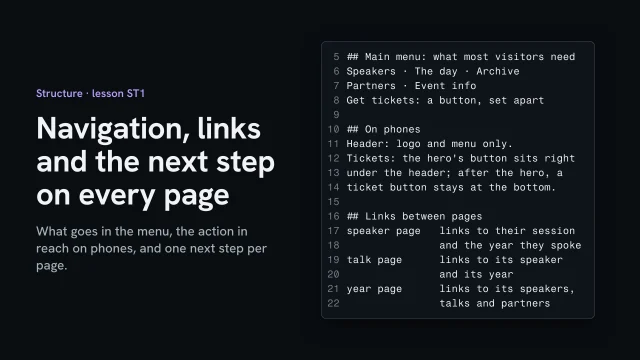
Decide what goes in the main menu, how the one action stays in reach at every width, and how kinds of page link to each other, following the visitor’s next question. Then give every page one main next step.

Before you start
The site plan with every page's job, and the visitor's path from Plan.
You’ll learn
  • Keeping the main menu to what most visitors need
  • Keeping the one action in reach at every width
  • Linking pages the way visitors' questions follow each other
  • Ending every page with one main next step
You’ll make
A navigation and links section in the site plan: the main menu, how the action stays in reach on phones, the links between page types, and each page's next step.
Worked example
AllWeb: five menu links and the ticket button set apart; on phones the hero's ticket button sits under the header, then a ticket button stays at the bottom.
Check it
Nothing is in the main menu just because sites have it, the action is reachable at every width, and every page has exactly one main next step.
Used next
The content model gives each page type its slots, and the build follows the menu and links as written.

Done when nothing is in the main menu just because sites have it, the action is reachable on a phone, and every page has exactly one main next step.

Define page types and their slots

Group your pages into types, and list the slots each type must hold: what goes in it, where that comes from, and how many. Then fill every slot for one real item and note what you couldn’t fill.

What you’ll make

Before you start
The site plan.
You’ll learn
Page types and slots, each with a rule, a source and a count, tested on one real item.
You’ll make
A content model.
Worked example
The bakery’s content model: three page types. Today’s bread uses the product list; Visit, About and Contact use the info page.
Used next
Copy, components.

My content model

Page type 1
Page type 2
Page type 3
Page type 4

Copy or download your answers before you leave this page.

Name each slot for what it carries, not how it looks: “today’s loaves”, not “card grid”.

Done when every page type has its slots, each with a rule, a source and a count, and one real item has been filled in from those sources.

More

Example project files

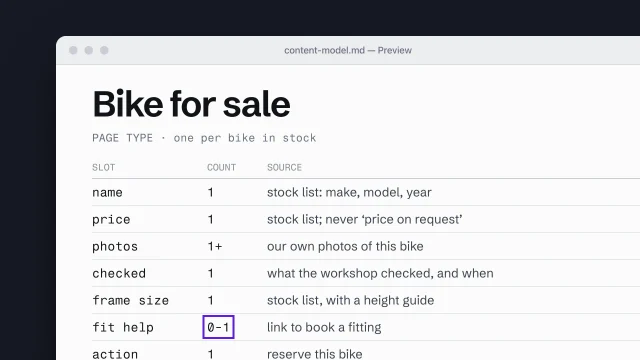
The skill’s own example, a fictional bike workshop: one page type as slots, with the count and the source on each line.

Content model: one page type
1PAGE TYPE Product list (one entry per loaf)
2name 1 head baker's list: the name regulars use
3description 1 head baker: what's in it, in one line
4price 1 the owner: always shown, never 'ask in store'
5allergens 1+ head baker: every allergen in the loaf
6state 1 daily limit: in stock, few left, sold out

From the skill Build a content model from page types and slots · fictional client

Where yours go: Organize your project, in Prepare.

Full transcript

A sitemap tells you which pages exist. It doesn't tell anyone what goes on them, and that gap is where generic pages come from.

Start by sorting the sitemap into page types. A page type is a pattern of content that repeats. The bakery's six pages come down to three types. Today's bread is a product list: one entry per loaf, the same slots every time. Order ahead is an order form. Visit, About and Contact are info pages. Thinking in types keeps scope honest. The bread list changes every morning, and six loaves written up one at a time are six chances to drift. If you started from a site blueprint, it already lists the pages and the sections on each. Treat those sections as your first draft of slots, then give each one this client's rule, source and count.

Each page type is a set of slots. A slot is a named piece of content the page has to carry. It isn't a box in a layout, and it isn't a database field yet, though it may become one. Define each slot by four things. A name that says what it carries. A rule for what it must contain. A source, meaning where the content comes from: a fact from the bread list, copy someone writes, or evidence like a photo or a review. And a count: exactly one, one or more, or allowed to be empty.

Here's one written out. Read the source column first, because that's where most of the thinking is. The price comes from the owner, and the rule says always shown, never 'ask in store'. The allergens come from the head baker, every one, for every loaf. Nobody can fill those by writing nicely. If the source doesn't exist yet, the slot stays empty, and you've found a research task for the client. Here, on the ninth of October, nobody had written down prices or allergens.

Name slots for what they carry. If your model says hero, feature grid, testimonial carousel, you've designed the page before you know what's on it, and you've picked the components everyone else picks. 'A regular's words' could end up as one quote set large, or a single line beside the order button. 'Testimonial carousel' has already decided, and it decided the average. Design decisions come later, from the content.

The count matters more than it looks. One photo or twelve is a different component. 'Optional' means the page has to look finished when that slot is empty, and someone has to design that state on purpose. When you get to building components, these counts are the specification. When you get to copy, each slot is the brief for one piece of writing, with its length and its source already set.

Before you hand the model on, test it against one real instance. Take one actual loaf, the sourdough, and fill every slot from its real source. You'll find things. On the ninth of October, the bread list had the name and the description, but no price and no allergens. Each gap is either a slot that shouldn't exist or a fact the business needs to start keeping. Here it was two questions: prices for the owner, allergens for the head baker. The content model is ready when one real loaf fills every slot. Better to find the gaps with one loaf than after the whole list is built.

This is also the most useful file you can give an AI agent. Without it, the agent fills each gap with what pages like this usually say. With it, the agent knows each slot, its source, and when to leave it empty and say so.

Design the slots before the page. A slot says what must be there and where it comes from, never what it looks like.
What a slot is
  1. Its name, for what it carries
  2. What it must contain
  3. Where its content comes from
  4. How many: one, several, or none

A slot is named for what it carries, so Design is still free to decide what it looks like.

Named for the design

  • Hero
  • Feature grid
  • Testimonial carousel
  • CTA banner

Named for the content

  • The queue photo
  • Today's bread
  • A regular's words
  • Order ahead

Test it on one real thing:

  1. Pick one real thing: one loaf
  2. Fill every slot from its source
  3. Note the slots you can't fill
  4. Fix the model, or ask the client

Further reading

Optional at this stage. Useful once the content model is written down.

  • Schema.org Schema.orgMost parts of a content model already have a name here: a service, a price, opening hours, a person. Borrow the names and the developer has less to translate later.

Every tool here is made by someone else. Aesthetary isn't affiliated with any of them, and listing one doesn't mean its maker endorses Aesthetary.

What each slot needs, by page pattern

Patterns, the IA Library: the modules each page pattern includes, what each content slot needs, and the research behind it.

On the AllWeb project

On AllWeb, a speaker is a kind of page with the same slots every time: name, role, photo, short bio.

A speculative redesign, not commissioned by AllWeb.

Turn the visitor’s questions into the homepage’s sections

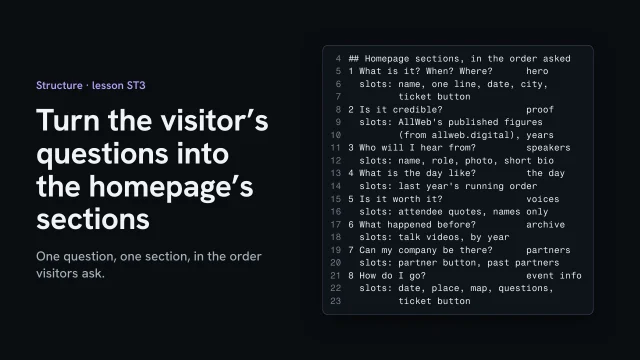
Take the questions your main visitor asks, in the order they ask them, and give each its own section of the homepage: what it has to answer and the slots it holds. Put proof where a stranger would need it.

What you’ll make

Before you start
The visitor's questions in order (from Plan) and the content model's page types.
You’ll learn
  • Giving each question its own section, in the order people ask
  • Writing each section's slots
  • Putting proof where a stranger needs it
  • Checking the build kept the order
You’ll make
A homepage section list in the content model (each section, the question it answers, its slots and proof) and a CTA map: each section's one action and where it appears.
Worked example
AllWeb: eight sections from 'What is it? When? Where?' to 'How do I go?'; in the built page each section starts with a note naming its question. The CTA map puts Get tickets in the header, the hero, event info and the footer, and pinned to the bottom on phones after the hero; partners get Become a partner.
Check it
Every question has a section, every section answers one question, and the order matches the order visitors ask.
Used next
The copy is written slot by slot into this list, and the wireframe lays it out in this order.

Homepage sections

Section, in order 1
Section, in order 2
Section, in order 3
Section, in order 4
Section, in order 5
Section, in order 6

Copy or download your answers before you leave this page.

This is your visitor’s order of questions, not a formula. A different site, with different visitors, gets a different order.

Done when every question has a section, every section answers one question, and the order matches the order visitors ask.

More

Example project files
index.html, the note at the top of each section
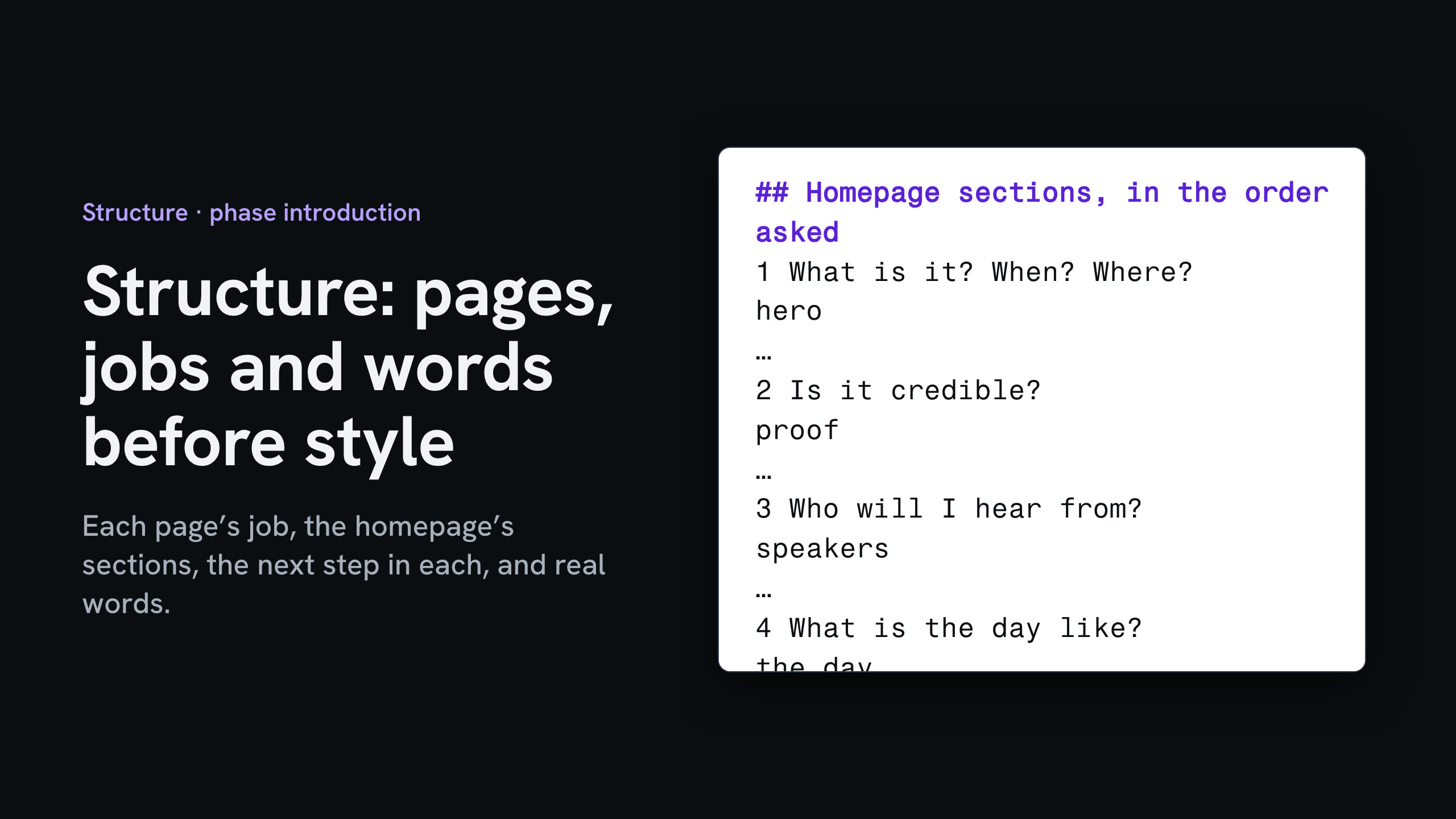
11 · WHAT / WHEN / WHERE / ACTION
22 · IS IT CREDIBLE?
33 · WHO WILL I HEAR FROM?
44 · WHAT IS IT LIKE / WHAT HAPPENS DURING THE DAY
56 · WORTH IT?
67 · ARCHIVE
78 · PARTNERS
89 · HOW DO I GO?

From the lesson Turn the visitor's questions into the homepage's sections · A speculative redesign, not commissioned by AllWeb.

Where yours go: Organize your project, in Prepare.

Full transcript

A one-page site has to answer questions in the order people ask them. In Plan, you wrote down the attendee's questions, in order. Now each one becomes a section of the homepage.

Give each question a section: what it must answer, the slots it holds, and what it asks next. What it is, when and where go first, with the ticket button, because that's what someone arriving cold needs. Is it credible comes next. A stranger won't care who's speaking until they believe the event is real. The proof is AllWeb's own published history, and the figures come from their site.

Then who will I hear from, what the day is like, whether it's worth it, and what happened before. Each section answers one question, and none tries to answer two. The last section asks how do I go, and repeats the date, the place and the ticket button. By the bottom of the page, a convinced visitor is ready to act.

Then check the build kept the order. On the built page, each section starts with a note naming its question. One search lists them, top to bottom. Those notes are for whoever edits the page next. Move a section, and the note says which question you just moved.

Last, map the calls to action. For each section, write the one action it offers and where it sits. One search finds every action button on the page: five for tickets, one for partners. Write each one down with its place. The header button is hidden on phones, so phones get one pinned to the bottom after the hero. Now nobody has to guess where the next step is.

Take the visitor's questions in the order they ask them, give each one a section with its slots, map where each action sits, and keep that order all the way into the code.

Sections in the order asked
  • What, when, where: the hero
  • Is it credible: the proof
  • Who, the day, worth it
  • How do I go: date, place, button

List what every slot needs before design

Go through your sections slot by slot. For each, write what fills it (the words, the image, the facts), where it will come from, and whether you have it, need to ask for it, or need to shoot or find it.

What you’ll make

Before you start
The homepage section list and the content model's slots, and what you found about image rights in research.
You’ll learn
  • Going through every slot and writing what fills it
  • Naming a source for every image
  • Turning what's missing into asks to the client
  • Leaving a labeled gap instead of a stand-in
You’ll make
An asset list: each slot, what fills it, where it comes from, and its status (have it, ask for it, shoot or find it).
Worked example
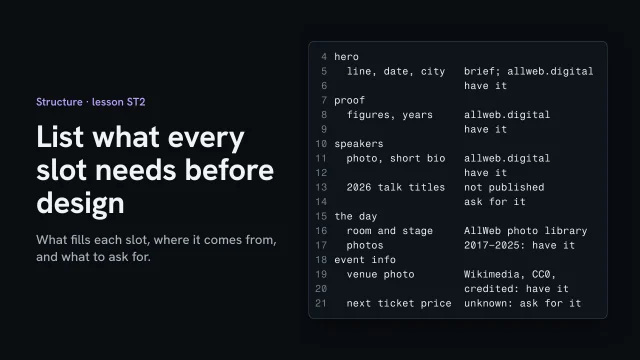
AllWeb: the 2026 talk titles aren't published and the next ticket price is unknown, so both are asks. The venue photo is CC0 from Wikimedia Commons and credited on the page.
Check it
Every slot has a source and a status, every image's source is named, and nothing missing is filled with a stand-in.
Used next
The copy is written slot by slot, and Design picks up the image list.

Asset list

Page and slot 1
Page and slot 2
Page and slot 3
Page and slot 4
Page and slot 5

Copy or download your answers before you leave this page.

Where nothing fits, leave an empty, labeled box that says what to shoot or find. A visible gap gets filled; a stand-in gets shipped.

Done when every slot has a source and a status, every image’s source is named, and nothing missing has been filled with a stand-in.

More

Example project files
asset-list.md
1hero: line, date, city · the brief and allweb.digital · have it
2proof: figures, years · allweb.digital · have it
3speakers: photo, short bio · allweb.digital · have it
42026 talk titles · not published · ask for it
5the day: room and stage photos · AllWeb photo library, 2017–2025 · have it
6venue photo · Wikimedia Commons, CC0, credited · have it
7next ticket price · unknown · ask for it

From the lesson List what every slot needs before design · A speculative redesign, not commissioned by AllWeb.

Where yours go: Organize your project, in Prepare.

Full transcript

Before anyone designs, know what will fill every slot. The section list says which slots exist. Now write down what each one needs, and where it will come from.

Walk the page section by section. The hero needs a line, the date and the city: the line from the brief, the rest from AllWeb's own site. The proof needs the published figures, and the speakers need a photo and a short bio each. Some things don't exist yet. No 2026 talk titles have been published, and the next ticket price is unknown. Those become asks to the client, never guesses.

Every image needs a source you can name. Most of these come from AllWeb's own photo library. The venue photo came from Wikimedia Commons, free to use, and the page credits it anyway. AllWeb's own photos are fine in a concept. A real launch needs the client's written OK, so the list says that too.

Where nothing fits, don't drop in a stock photo or an AI picture. The brief's rule is an empty, labeled box that says what to shoot or find. A visible gap gets filled. A stand-in gets shipped.

List what fills every slot and where it comes from. Ask for what's missing, and leave a labeled gap rather than a stand-in.

Write true copy for each slot

Write each slot to its rule, in the words your customers use, with specifics instead of adjectives. Trace every fact to its source, and put a [CONFIRM: …] marker where you don’t have one.

What you’ll make

Before you start
The content model, customer words, the claims list.
You’ll learn
Writing to each slot in customers’ words, specifics over adjectives, the swap test, and loud [CONFIRM] markers.
You’ll make
A copy sheet: copy per slot with sources or markers.
Worked example
The bakery’s copy sheet
Used next
Wireframe, Build (page check checks against it).

My copy sheet

Voice

Three rules the copy follows, each with one line from this sheet that keeps it.

CTA map

The table’s last two columns are the CTA map: the one action each page or section asks for, and where it appears.

Checks

Page and slot 1
Page and slot 2
Page and slot 3
Page and slot 4

Copy or download your answers before you leave this page.

If AI drafts it, give it the slot, the sources and your customers’ words, then cut the tells: three adjectives where one fact belongs, “we pride ourselves”, a last line that repeats the heading.

Done when every slot has copy a competitor couldn’t paste onto their own site, every fact in it has a source or a marker, and you’ve searched the copy for markers before it goes anywhere.

More

If the site is translated

Localize with explicit uncertainty: translate from the finished copy, slot by slot, and mark each line ready, check or hold until someone fluent signs it off.

Where translations go wrong quietly:

  • Numbers: prices, hours, dates
  • Formal or informal 'you'
  • Quotes and legal lines
  • Length: the line no longer fits
The sheet that travels with a translation
1SLOT STATUS WHY
2prices ok all six match the source exactly
3nav.order check reads back as 'order forward'
4order.rule check '6 pm' became '18:00'
5order.tone check formal 'you' chosen; the brand is casual
6allergens hold 'nuts' reads back as 'walnuts': safety, fluent reader only

From the skill Localize with explicit uncertainty · fictional client

Example project files

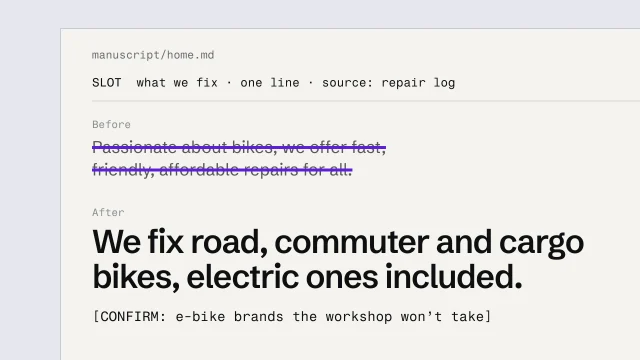
The skill’s own example, a fictional bike workshop: one slot, its rule and its source, before and after.

One slot, rewritten
1SLOT About · intro · one line · source: the owner
2
3Before Nestled in the heart of the neighborhood,
4 we're passionate about baking fresh,
5 delicious, artisan bread for everyone.
6
7After A neighborhood bakery for bread: the Country
8 loaf, rye, buns and tins, baked every morning,
9 for the people who queue for it.
10
11 The founding year has its own slot:
12 [CONFIRM: founding year]

From the skill Write specific, true copy for each slot · fictional client

Where yours go: Organize your project, in Prepare.

Full transcript

Here's a line from an AI's first draft of the bakery's About page: 'Nestled in the heart of the neighborhood, we're passionate about baking fresh, delicious, artisan bread for everyone.' Every bakery in the country could put that on their site tomorrow, and that's what's wrong with it.

Write slot by slot. The content model already tells you each slot's job, how long it can be, and where its facts come from. Today's bread's intro is one line, from the head baker's bread list. The order rule comes from the decision made in strategy. When you write to the slot, the padding goes, because there's no room for it and nothing to pad with. Most bloated pages come from someone writing 'the homepage' in one sitting and filling the space.

Then use the words customers use. The bakery's reviews say 'the sourdough sells out by ten' and 'I order the rye for Saturday'. Nobody writes 'artisan sourdough boule'. The glossary you built in research decides the nouns. If a customer would type it into a search or say it at the counter, it belongs in the slot. If only the business says it, swap it for the customer's word or leave it out.

Swap adjectives for specifics. 'Fresh' is a claim nobody can check. 'Order by six for pickup the next day' is something a customer can hold the bakery to. Notice the placeholder. The AI's draft said the bakery opened in 1998, and nobody could find a source. So the line says CONFIRM, in brackets, until the owner tells me. Then run the swap test on every sentence: could a competitor paste it onto their own site unchanged? If so, write what only this business can say, or cut it.

Specific copy makes claims, and claims need sources. For each sentence with a fact in it, find the claim and match it to the claims list you built in research. Baked every morning: the owner says so, and it's on the list. Since 1998: no source anywhere. No source means a placeholder or a cut. And placeholders have to be loud. A quiet one, like 'TBC' in gray text, gets read past and published. Use one format everywhere: square brackets with the word CONFIRM. Then, before anything is reachable, run one text search across every page and file in the project for an opening bracket followed by CONFIRM. You're done when that one search lists every fact still open.

If an AI drafts the copy, give it the slot, the source material and the customers' own words, then read what comes back for the tells. 'It's not just bread, it's a tradition.' Three adjectives where one fact should be. 'Whether you're grabbing breakfast or planning a dinner party.' Words that only exist on websites: nestled, passionate, pride ourselves. And a closing line that says the heading again. None of these is banned. They're the sound of a sentence written for any business, and each one usually sits where a specific fact should go. Find the fact, or delete the line.

Here's the line from the start, rewritten for its slot. It's one line, because the slot says one line. Everything in it comes from the owner, and the year the draft made up isn't in it: that has its own slot, marked CONFIRM, until the owner answers. It's less exciting than the original. It's also the only version a regular reads and thinks: that's my bakery.

If a competitor could paste your sentence onto their site, it isn't finished. Write to the slot, trace the fact, and mark what you can't confirm.

Trace the facts, cut the tells
  1. Find the claim in the sentence
  2. Match it to the claims inventory
  3. No source: placeholder, or cut it
  4. Search for every placeholder

Anyone could claim

  • Fresh, delicious, artisan
  • Passionate about baking
  • Expert bakers
  • Quality you can trust

Specifics only

  • Baked every morning
  • Order by 6 pm for next day
  • Since [CONFIRM: year]
  • Six loaves, a daily limit each

Tells to cut from a draft:

  • 'It's not just X, it's Y'
  • Three adjectives, no fact
  • 'Whether you're new or a pro'
  • 'Nestled', 'we pride ourselves'
  • A last line repeating the heading
Before and after, page type by page type

Twenty-two examples of website copy rewritten, each with the principle behind the change, are in Copy & Content

On the AllWeb project

AllWeb’s strategy draft suggested the headline “Ideas worth leaving your screen for.” Annie chose “Learn how to put AI to work.” for that slot. The redesign is in English only; an Albanian version would follow the localization lesson, with a fluent reader checking it before it’s published.

A speculative redesign, not commissioned by AllWeb.

Wireframe a page for hierarchy

Sketch one page in gray, with no colors or fonts, using the real copy and boxes that say what each image will show. Number every slot in the order you want it read, and say what must stay put on a phone.

Also in this task

Plan responsive structure as rules 3 min

The lesson’s own page, with its transcript

Plan section rhythm across a page 3 min

The lesson’s own page, with its transcript

What you’ll make

Before you start
The copy and the content model.
You’ll learn
A gray wireframe with real copy, numbered reading order, the squint test, and what must survive at every width.
You’ll make
A wireframe with numbered slots.
Worked example
The bakery’s home page wireframe
Used next
Design dresses it; Build keeps its order.

My wireframe

On a phone

Number 1
Number 2
Number 3
Number 4

Copy or download your answers before you leave this page.

Gray boxes and real words. A screen reader follows the order the page is built in, so the built page keeps these numbers too.

Done when the page has one element read first, every slot is placed and numbered with real copy, and someone else has read it in the order you meant.

More

Plan where the page rests and peaks

Plan section rhythm across a page: mark each section dense, medium or quiet, pick the one peak, and keep the sheet to check the build against.

A homepage rhythm sheet
1# SECTION DENSITY SPACE ABOVE
21 Queue photo + headline PEAK none
32 Order ahead, one line quiet 1 rem
43 Today's bread medium 2.5 rem
54 Visit: hours, address dense 2.5 rem

From the skill Plan section rhythm across a page · fictional client

Flat rhythm

  • Same padding on every section
  • Three cards, three times over
  • Every section: heading, grid
  • Two dense sections in a row

Planned rhythm

  • Gaps from the spacing scale
  • One layout per job
  • A quiet band after a dense one
  • One peak, then the action
Write the phone rules

Plan responsive structure as rules: what must survive at every width, what may change and on what condition. Write them per page type, in sentences.

Responsive rules for one page type
1PAGE TYPE Today's bread
2KEEP main element: the bread list
3KEEP reading order the same in code and on screen
4KEEP Order ahead within reach at every width
5KEEP no sideways scrolling, down to 320px
6KEEP each loaf's price and status in its row
7MAY the menu beside the shop's name while it fits, otherwise under it
8MAY a loaf's price beside its name while both fit, otherwise under it
9NEVER hide a loaf to save space
10NEVER a breakpoint named for a device

From the skill Plan responsive structure as rules · fictional client

A rule anyone can follow names:

  1. The element it applies to
  2. What changes
  3. The condition that triggers it
  4. What must stay the same

Further reading

The rules about what comes first are IA's to write. Building them is Design's and Build's job, and it helps to know what's possible.

  • Learn Responsive Design web.dev (Google)Read the layout chapters before you write the responsive rules, so every rule you set is one a builder can keep.

Every tool here is made by someone else. Aesthetary isn't affiliated with any of them, and listing one doesn't mean its maker endorses Aesthetary.

Worked example: a plumber’s home page, numbered in reading order
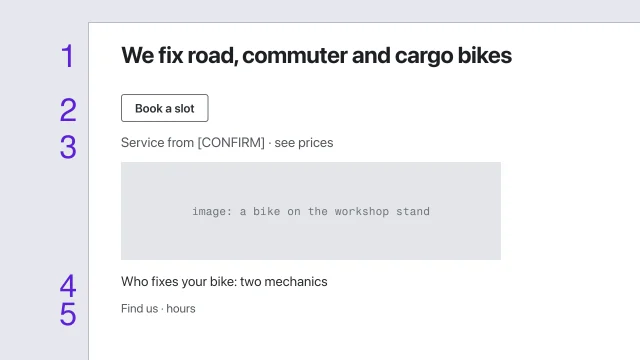
Home, as a wireframe: gray boxes, real words, no style yet.

Read in this order

  1. 1What this isTrade and town in plain words.
  2. 2Main actionIn an emergency people phone. The call goes on every view, with when it is answered.
  3. 3Where we workThe eligibility check, next to the action.
  4. 4ProofRegistrations, insurance, review count: what each must show comes from the field’s rules.
  5. 5ServicesJob types, each linking to its priced page.
  6. 6What happens nextWhat happens after you call: who comes, when, what it costs to come.
  7. 7Who you’ll deal withWho turns up. Depends on whether clients choose who comes.
  8. 8What clients sayAttributed, dated, sourced.

The firm is fictional. Its brief is one of the test cases the IA Library was checked against.

Example project files

The skill’s own example, a fictional bike workshop: the top of its homepage as text in a box, numbered in reading order.

The same page asked of an AI builder that works in project folders. The file names are that example’s; the point is the list of things to leave unresolved.

Asking an AI builder for a gray sketch
1Build a structural wireframe of the homepage
2in sketches/home.html. Grayscale, system font,
3no brand color, no images: gray boxes labeled
4with what each image will show. Use the copy in
5manuscript/home.md word for word. Number each
6slot in the reading order in notes/home-order.md.
7Work only in sketches/. Leave the site folder alone.

From the skill Wireframe for hierarchy before style · fictional client

Where yours go: Organize your project, in Prepare.

Full transcript

Ask an AI agent for a homepage and you get a styled one: a color, a font, a gradient, a stock photo. Then the review turns into an argument about the gradient, and nobody notices the prices are buried at the bottom.

So solve the structure first, on purpose, before any style exists. Here's the same homepage in gray, with the bakery's real copy. Style gets in the way of these decisions. A gray page keeps everyone looking at the order.

Keep it deliberately unresolved. Grayscale, the system font, no brand color, and boxes labeled with what each image will show. The copy, though, is real, because hierarchy depends on what the words say and how long they are. Lorem ipsum hides both. Sketch on paper, draw boxes, or have an agent build a rough structural page, as long as it lives somewhere separate from the production site.

Now number everything in the order you want it read. Number one is the dominant element. For the bakery, that's the photo of the morning queue, then the headline under it, then the button, then today's bread, then the visit details.

Then test it. Step back from the screen, or blur it, and see what your eye lands on first, then second. Here's a draft where the bread list is set big and dark. Blur it, and the list lands first. The numbers didn't hold. Make the list quieter and squint again. The photo wins, then the headline. Better still, show it to someone for five seconds and ask what the page is about.

If you'd rather have an agent build the rough page, tell it what to leave unresolved, as plainly as this. Without those lines it will reach for a color and a typeface, because that's what a finished-looking page has. Pointing it at the manuscript keeps the real copy in. Pointing it at a separate folder keeps the sketch out of the site, so nobody can mistake it for the start of the build.

Reading order isn't only visual. A screen reader follows the order the page is written in the code, and WCAG asks that the reading sequence can be worked out correctly wherever order affects meaning. So the code says the same order, and at phone width the slots stack in that order too. Decide it here and the build can follow it.

The wireframe's done when each page type has one dominant element, every slot from the content model is placed and numbered, the copy is real, and someone who isn't you reads it in the order you meant. Then style has something to serve.

Decide what the eye hits first and what it reads next while the page is still gray. Style comes after, and it has to keep that order.

On the AllWeb project

AllWeb went from moodboard to code without a gray wireframe. On a new project, do this step, starting from the homepage section list. Its page alternates dense and quiet sections, and its phone layout is the same page under rules, not a separate design.

A speculative redesign, not commissioned by AllWeb.