Plan

A one-page brief that says what the site is for and who it’s for, and a sorted list of what it needs before launch.

0 / 9 complete

Starts with
Evidence package, Claims list, Audit and baseline
Produces
One-page brief, Requirements, Objectives
Feeds into
Structure

Production Checklist

  1. Video, 1:14 Introduction to Plan Introduction
  2. Video, 2:22 Name the audiences and what each needs to know Makes: Audiences
  3. Video, 4:14 Choose the site’s one action Makes: Primary action
  4. Video, 2:29 Scope and price the work Optional
  5. Video, 3:26 Write a position you can prove Makes: Position
  6. Video, 3:49 Plan the path to one step Makes: Visitor path
  7. Video, 2:00 Plan the answers for search and AI Makes: Search and AI plan
  8. Video, 3:17 Sort wishes into requirements Makes: Requirements
  9. Video, 1:30 Decide how you’ll know it worked Makes: Success measures
  10. Video, 1:21 Scope and exclusions Makes: Scope and exclusions
  11. Video, 3:33 Write the one-page brief Makes: Project brief
  12. Video, 2:43 A proposal in the client's own branding Optional

Scope and price the work

Agree what is in, added and later before you start, and price it from your own hours.

More

Full transcript

The printer who made the bakery's bags has seen the new site, and wants one. The email asks for a few pages, a way to ask for a quote, and a price by Friday. Before you send a number, agree what the number buys, and write down what it assumes.

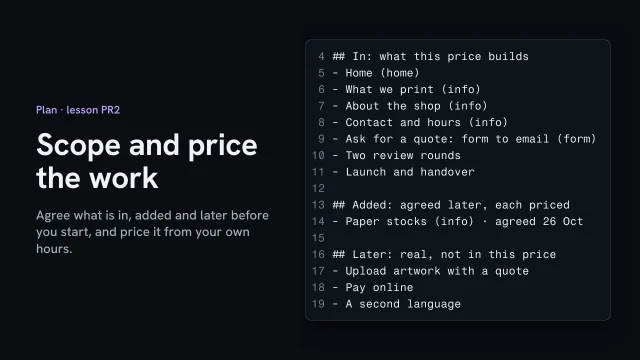
Start with a scope sheet. In lists what this price builds: five pages, each named with its job, two review rounds, and the launch. Later holds real wishes you won't build this time: uploading artwork, paying online, a second language. Writing them down shows the client you heard them. Added stays empty for now. It fills only when the client chooses a change, with its price. Send it before any work starts, and get a yes in writing. Now there's a clear line between the job and a change.

To price it, count page types, not pages. Five pages are three types: one home page, three info pages, and one form. The second info page reuses the first one's work, so it costs less. Take the hours from your own time log, not from someone else's chart. On your last site, the first info page took four hours, and the next two a little over two each. The script counts the scope against the log: thirty-two hours. The rate here is an example, and the page says so. Yours comes from your own costs. Say when it's paid, too: here, half to start and half at launch, again only an example. Under the fee, write what it assumes: these five pages, the shop's words and photos before work starts, two review rounds. If one of those changes, the price changes, and the client can see why.

A few days in, the printer asks for two more things: artwork uploads with the quote, and a page about paper stocks. Neither is in the scope. Don't just say yes, and don't just say no. Uploads are already in Later. The paper page is one more info page: two and a quarter hours from your log, at the same example rate. So ask: add it now for that price, or keep it for later? The printer adds the page, and the upload waits. Write it under Added, with the date, and run the numbers again. The new total is the old one plus a change the client chose, so the invoice holds no surprises.

Agree what's in, added and later before work starts. Then price it from your own hours, and show what the fee assumes.

A proposal in the client's own branding

Build a proposal page and PDF in the client's brand: problem, approach, scope, price and terms.

More

Full transcript

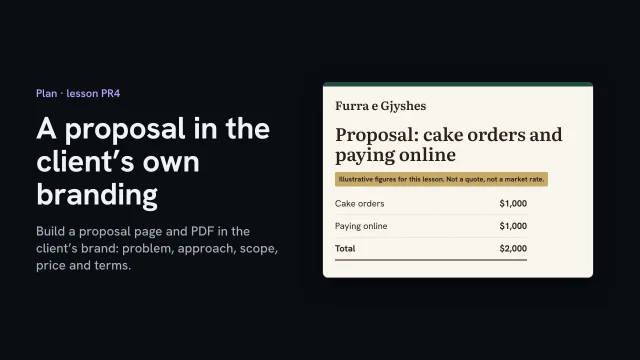
After launch, the owner asks what it would take to add the two things left for later: cake orders and paying online. She wants it in writing. A proposal in her own brand reads like her project, not a template. Here's how to build one, and send it as a page and a PDF.

Start from her live site, not from memory or a screenshot. A short script opens the home page and reads the styles the browser actually used: the green of the order button, the paper and text colors, the heading brown, the gold, and the two typefaces. It saves them as tokens, each with where it came from, so the proposal uses her green and not a near miss. The proposal's stylesheet uses nothing else.

The page opens with her as the client and you as the sender. Then the problem as she'd put it: cakes sell in the shop but can't be ordered, and every order is paid at pickup. Then the approach, in two sentences she could say back to you. Scope names what's in and what isn't. Delivery isn't in, and neither is wholesale ordering. What you leave out keeps the price true.

Then the price, with what it assumes: the head baker sends the cake list, and the owner picks the payment service. These figures are illustrative, for this lesson, not a market rate. Working out a real price is its own lesson. Terms say when you're paid, how long the offer stands, and how a change gets priced. Then what you need from them, with a name on each. How much notice a cake needs is still open, so the page says so, in words.

It's in her colors, so make clear who it's from: your name at the top and in the footer, and a line saying it isn't a page of her website. It goes online only so she can open it on her phone, so it gets the same safeguards as a spec demo. Check them on the link: the noindex header is there, and there's no preview tag. One bracket is left, the date the offer runs to. Fill it in and search again: nothing.

Some owners file a proposal or forward it, so send a PDF too. Make it from the same page, so the two never disagree. A print stylesheet sets the paper size and keeps each section in one piece, and a short script prints the page to a file: two pages, letter size. Then open it and read it as she will: her colors and type, the illustrative label still beside the price, and your name at the foot of both pages.

A proposal in the client's brand reads like their project. Take the brand from their live site, cover the problem, scope, price and terms, make clear it comes from you, and print the PDF from the same page.

Introduction to Plan

Starts with
Evidence package, Claims list, Audit and baseline
Produces
One-page brief, Requirements, Objectives
Feeds into
Structure

Name the audiences and what each needs to know

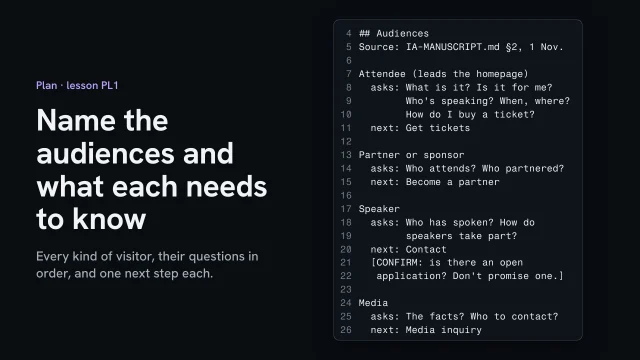
List every kind of visitor the site serves, and under each write the questions they arrive with, in the order they’d ask them, and the one step you want them to take. Then choose which audience the homepage leads with.

What you’ll make

Before you start
Your research notes and the customers' own words, so the audiences come from evidence.
You’ll learn
  • Listing every kind of visitor the site serves
  • Writing each one's questions in their words, in the order they ask them
  • Spotting a next step that promises what the business hasn't offered
  • Choosing which audience leads, and writing why
You’ll make
An Audiences section in the brief: each audience, its questions in order, and its one next step, with the lead audience named and the reason.
Worked example
AllWeb (a speculative redesign): five audiences. Attendees lead, because tickets are the one action; the speaker's next step is Contact, with a CONFIRM marker, because no open application is known to exist.
Check it
Every audience has its questions and one next step, nothing promises an offer you can't point to, and one audience is named as the lead with a reason.
Used next
The lead audience's one step is the site's one action, the next task. Their questions, in order, become the visitor's path, and later the homepage's sections.

Who the site is for

Audience 1
Audience 2
Audience 3
Audience 4

Copy or download your answers before you leave this page.

Start from your research notes and the customers’ own words. An audience nothing in your evidence shows arriving doesn’t get a row yet.

Done when every audience has its questions in order and one next step, nothing promises an offer the business hasn’t made, and one audience is named as the lead with the reason.

More

Example project files
brief.md, Audiences
1Attendee (leads): What is it? Who's speaking? When, where? How do I buy? → Get tickets
2Partner or sponsor: Who attends? Who partnered? → Become a partner
3Speaker: Who has spoken? How do speakers take part? → Contact [CONFIRM: open application?]
4Media: The facts? Who to contact? → Media inquiry
5Past attendee or searcher: Who spoke that year? Can I watch that talk? → The archive

From the lesson Name the audiences and what each needs to know · A speculative redesign, not commissioned by AllWeb.

Where yours go: Organize your project, in Prepare.

Full transcript

This is a speculative redesign I made of the AllWeb conference site. AllWeb didn't commission it, and its ticket button is a demo. A bakery mostly serves regulars. A conference has at least five kinds of visitor, and each one arrives with different questions. So before you decide what the site asks anyone to do, write down who comes and what they need to know.

Start from your research notes, not a blank page. My strategy draft names five audiences: people who might buy a ticket, partners and sponsors, speakers, the media, and people searching past years for a talk. A list like that is still a draft. Check each audience against what research found. If nothing shows them arriving, they don't get a row yet.

Now take one audience at a time and write its questions in its own words. The attendee's list runs twelve lines. It opens with what is this, and is it for me. Price comes near the end, and how do I buy a ticket is last. That order is information. Nobody asks how to buy before they know what the thing is. Keep the order here, because the page structure will follow it later. Under each list, write the one step that audience should take. Attendees get tickets. Partners become a partner. The media send an inquiry.

Then put it in the brief, short enough to read in one look: who they are, their first questions, and their next step. One block per audience. Watch for a step that promises something the business hasn't offered. The draft says it outright: don't promise an open speaker application unless one exists. So the speaker's next step is contact, and the question goes to AllWeb as a confirm marker.

Last, choose who leads the homepage. Partners matter, and they pay. But this site's one job is selling tickets for the sixth of November, so attendees lead, and the brief says why in a line. Here's that decision on the built page. The first screen answers the attendee first: what it is, when, where, and the ticket button. Partners get their own section further down, with their own button.

Write down who comes, what each one asks, in the order they ask it, and the one step you want them to take next.

If you own, make or teach this site
If you own or pay for the site
You decide the site’s one job and who it’s mainly for. Ask to see the one-page brief, and what will be counted three months after launch.
If you make it
You write the brief and the requirements list from the research and the interviews. Check that no feature request has slipped in dressed as a need.
If you teach it or run a program
Practice the swap test: put a rival’s name on the position and see if it still fits. Assess a brief by asking what could fail it. If nothing could, it isn’t one yet.

Choose the site’s one action

List what a visitor could do on the site and why each matters to the business, then pick the one the site leads with. Scope the first version in kinds of page, and write beside it who keeps it up to date.

Also in this task

Choose a stack by who edits after launch 4 min

The lesson’s own page, with its transcript

What you’ll make

Before you start
The research files.
You’ll learn
Choosing the primary action with four questions, scoping in page types with options, and writing upkeep beside each option.
You’ll make
What the site is for: the one action, the others, page types, who keeps it updated.
Worked example
What the bakery’s site is for
Used next
Visitor path, site plan, brief.

What the site is for

What a visitor could do

Ask of each whether it earns or saves money, whether the business can deliver what follows, whether a visitor can finish it in one visit, and whether the owner would notice if it stopped.

Action 1
Action 2
Action 3
Action 4

Copy or download your answers before you leave this page.

Choose the action yourself. AI can tell you what each option leaves out and what upkeep it creates, but it doesn’t know where the money comes from.

Done when one action is chosen with its reason, the others have a place further down, and the scope says who updates what and how often.

More

Scope in kinds of page, not a page count

“A twelve-page site” tells nobody anything. A class page is one kind of page: build it once, and each new class is one more of it.

Scoped in pages

  • "A twelve-page site"
  • Priced before the content exists
  • Page thirteen starts an argument

Scoped in page types

  • Home, Class, Class list, Studio, Contact
  • Plus how many of each
  • A new class is one more instance
Example project files
What a visitor could do
1Book an evening class most income; set places
2Buy a piece a few; most sell at fairs
3Join the newsletter useful; nobody pays for it
4Follow on Instagram she posts there anyway
5
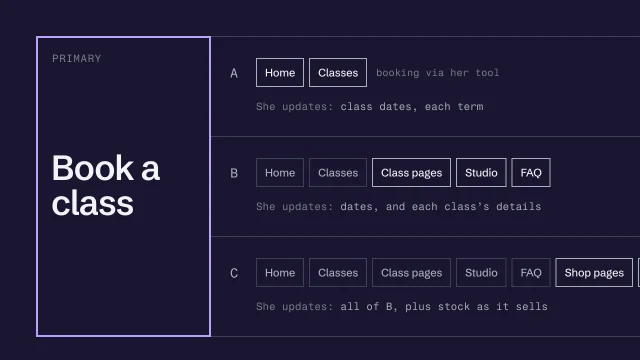
6PRIMARY: book a class
Three options, each with its upkeep
1A Home + one Classes page, booking via her tool
2 She updates: class dates, each term
3B A + a page per class, Studio, FAQ
4 She updates: dates, and each class's details
5C B + shop pages for her pieces, newsletter
6 She updates: all of B, plus stock as it sells

Every option leads with the same action. What changes is how much there is, and who has to keep it true.

From the skill Decide what the site is for, and how much to build · fictional client

Where yours go: Organize your project, in Prepare.

Full transcript

Ask a client what their website is for and you'll get a list. Book a class, buy a mug, join the newsletter, follow us. All reasonable. A page can only lead with one of them, though, and if you don't choose, the homepage chooses for you. Usually badly.

So the first decision is the primary action: the one thing a visitor does that makes the site worth having. Everything else can stay on the site. It just doesn't lead.

When it isn't obvious, I ask four things of each candidate. Does it earn or save the business money? Can the business actually deliver what happens after it? Can a visitor finish it in one visit? And would the owner notice if it stopped happening? The candidate with the most yeses usually wins. If two tie, ask the owner which one they'd miss first.

Here's a fictional ceramics studio. Priya runs evening classes and sells a few of her pieces. List what a visitor could do, and next to each, write why it matters to the business. Classes are most of her income, and every course has a fixed number of wheels to fill. Her pieces mostly sell at craft fairs. The newsletter matters, but nobody pays for it. So the primary action is booking a class. The others stay, further down, as secondary actions that don't compete for the first screen.

Next, how much to build. Don't scope in pages. 'A twelve-page site' tells nobody anything, and the term she adds a thirteenth class, it starts an argument. Scope in page types instead. A class page is one type. You design and build it once, and every course she runs is another instance of it, with the same slots filled differently. Then the real questions are which types exist, and how many instances you're writing content for. That's what the work actually costs.

Then give the client options, instead of one proposal they can only accept or reject. Three is enough. Each has to be a site you'd be happy to build and they'd be well served by. No decoy that exists only to make the middle one look sensible. That's a sales trick, and clients can smell it.

Here are Priya's. Option A is a homepage and one classes page, with booking through the tool she already uses. Option B adds a page for each class, a page about the studio, and an FAQ. Option C adds shop pages for her pieces and a newsletter sign-up. Every option leads with the same primary action. What changes is coverage, and the line underneath each one changes with it.

That line is who keeps it up to date. A site is only as accurate as the last time somebody edited it. Option C looks generous, but it means Priya updates stock on the website whenever something sells at a fair. If she won't, the shop pages are wrong within a month, and a visitor tries to buy a bowl that's gone. Write the upkeep into every option, in plain words, so she chooses the work along with the pages. Who edits, and how often, then decides the stack. That's the next skill.

Use a model as a second reader once you've drafted the options. Ask it what each option leaves out that someone booking a class would need to know. Ask what upkeep each one creates for an owner who teaches four nights a week. It's quick at that. Don't ask it to pick the primary action. It doesn't know where Priya's money comes from. You do, because you asked her.

Choose the one action the site exists for, then scope it in page types, with the upkeep written beside every option.

Who edits after launch decides the tools

Ask these before anyone names a tool (Choose a stack by who edits after launch).

  1. Who edits, and how comfortable are they?
  2. How often, and from what device?
  3. What changes: words, prices, whole pages?
  4. What must it do: enquiries, bookings, payments?
Three fictional clients
1Architect portfolio edits twice a year, via you
2 -> static HTML or Astro, built with an agent
3Village bakery bread list every Friday, phone
4 -> Framer, so she edits on the page herself
5Events organizer forty events in a spreadsheet
6 -> Astro, a page per entry from content files

The lesson’s examples name Framer and Astro. Pick by who edits, how often and from what device; the tool comes last.

Write the choice down

  1. Who edits, how often, what
  2. The stack, and why it fits
  3. What would make you switch
On the AllWeb project

AllWeb’s one action is tickets: its strategy draft asks for Get Tickets to stand apart as the main action. Pricing commissioned work comes up here too: Scope and price the work. Who edits after launch is AllWeb’s call; the redesign is static pages because nobody edits it yet.

A speculative redesign, not commissioned by AllWeb.

Write a position you can prove

Start from what your research found, and write one sentence on who the business is for and what it does that a rival can’t say. Put a rival’s name on it to test it, and point every phrase at a source.

What you’ll make

Before you start
Customer words, the category default, the claims list.
You’ll learn
A position that names who the business is for and what it does differently, the swap test, and pointing every phrase at proof.
You’ll make
A one-sentence position with sources and a not-claimed line.
Worked example
The bakery’s position
Used next
Brief, copy, directions.

My position

Phrase 1
Phrase 2
Phrase 3

Copy or download your answers before you leave this page.

AI can spot phrases your rivals share and words customers repeat. It can’t decide what’s different, and it can never supply the proof.

Done when the sentence stops being true with a rival’s name on it, every phrase has a source, and what you’re not claiming is written down.

More

Example project files
The swap test
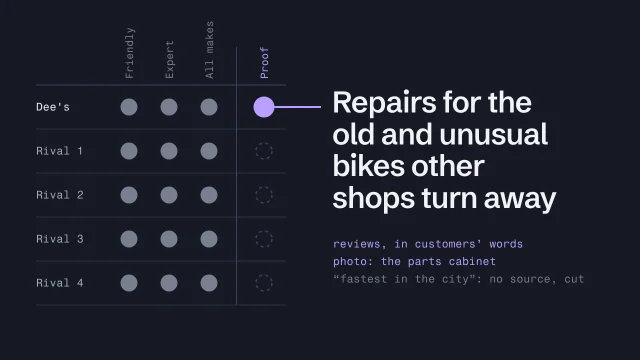
1Friendly, expert repairs for all bikes.
2 -> any rival's name fits. Cut.
3
4Repairs for the old and unusual bikes other
5shops turn away, with parts nobody stocks.
6 -> a chain store's name makes it false. Keep.
Written down for the brief
1POSITION
2For: people with old or unusual bikes
3Against: shops that send them away or upsell
4We: rebuild hub gears and steel frames here
5Proof: reviews, customer wording saved
6Proof: parts cabinet photo, confirmed by Dee
7Not claimed: speed. No evidence yet.Stops the next draft putting a guess back

Example: a fictional bike repair shop, run from a railway arch. From the skill Position with proof.

Where yours go: Organize your project, in Prepare.

Full transcript

Every bike shop says it's friendly, expert and passionate about cycling. A visitor reads those words and learns nothing, because the shop down the road says them too. A position is what you can say that they can't. And you only get to say it if you can prove it.

Here's the working definition I use. A position says who the business is for and what it does differently, and every word of it points at evidence. Adjectives don't count. Anyone can type them.

Take a fictional repair shop. Dee runs it from a railway arch. Her current site says friendly, expert, all makes and models. Then look at the evidence you gathered. Her reviews keep coming back to the same thing: old three-speeds and steel frames, bikes another shop said weren't worth fixing. Her inventory has a photo of a cabinet of discontinued parts she's collected for years. There's the position. She fixes the bikes other shops turn away. None of that was on her old homepage.

Order matters. Start from what you've collected: the claims map, the customer language, the inventory. Don't start from what the owner thinks makes them special, because that's usually an adjective too. Draft one sentence: who it's for, what the business does, and why that's different. Read it out loud. It should sound like something Dee would say to a customer at the counter.

First, the swap test. Put a competitor's name on the sentence. If it's still true, it isn't a position. 'Friendly, expert repairs for all bikes' survives any name you give it, so it goes. 'Repairs for the old and unusual bikes other shops turn away' stops being true the moment you put a chain store's name on it. That one stays. If the sentence sounds like the category default, the line every competitor already uses, you've written the default again.

Second test: point every phrase at a source. 'Other shops turn away': the reviews say it, in customers' own words. 'Parts nobody stocks': the photo of the cabinet, plus Dee confirming it. Now say she also wants 'the fastest turnaround in the city'. Nobody has measured that. You don't soften it into 'fast'. You drop it. When the proof runs out, the position gets narrower. It never gets padded with a guess.

One more check. A position can be true, provable and unique, and still be useless, because nobody chooses a shop on it. Dee's is also the only shop on her street with a blue door. Provable, and nobody cares. The customer language tells you what people care about. Dee's reviews bring up the old bikes again and again. That's how you know this is the right position, and not merely a defensible one.

Then write it down where the brief can use it. Who it's for, what they're choosing between, what the business does, and the proof, each with its source. Add a line for what you're deliberately not claiming. That line stops the next person, or the next AI draft, from putting 'fastest in the city' back in.

An AI can spot the phrases your sentence shares with competitor copy, and find what customers keep saying in the reviews. Ask it what makes Dee different, though, and you'll get adjectives back. And it can never supply the proof. Proof comes from the business.

Find the claim a rival couldn't make, then narrow it until every word has proof behind it.

Where AI helps, and where it can’t
  • Spotting phrases rivals share
  • Finding phrases customers repeat
  • Not: deciding what's different
  • Never: supplying the proof
From a position to the words on the page

Headlines, value propositions and calls to action, before and after, are in Copy & Content

On the AllWeb project

AllWeb’s homepage leads with “Learn how to put AI to work.” Its proof is AllWeb’s own published history, credited to allweb.digital.

A speculative redesign, not commissioned by AllWeb.

Plan the path to one step

Write who arrives, from where, and their questions in the order they’ll have them, with proof placed where they hesitate. End on a next step the business can keep, and make the button say what happens.

Also in this task

Let search intent shape the site 4 min

The lesson’s own page, with its transcript

What you’ll make

Before you start
The one action, the audiences.
You’ll learn
Writing a visitor’s questions in the order they ask them, putting proof where they hesitate, and a button that says what really happens.
You’ll make
A visitor path with questions, hesitations, proof and the button’s words.
Worked example
A regular’s path to ordering ahead: home, then today’s bread, then the order, then a confirmation that says when to collect.
Used next
Structure turns the order into sections and pages.

My visitor’s path

Their questions in order. The last row is the next step, one the business can keep.

Question 1
Question 2
Question 3
Question 4

Copy or download your answers before you leave this page.

Do one path for each kind of visitor that matters. Someone a friend sent needs a much shorter one.

Done when every question on the path has an answer in order, each hesitation has real proof beside it, and the button says exactly what happens next.

More

Example project files
One visitor’s path
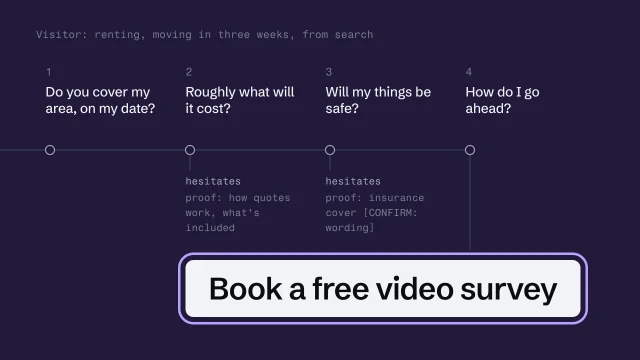
1Visitor: renting, moving in three weeks, from search
21 Do you cover my area, on my date?
32 Roughly what will it cost? <- hesitates
4 proof: how quotes work, what's included
53 Will my things be safe? <- hesitates
6 proof: insurance cover [CONFIRM: wording]
74 Next: book a free 15-minute video survey

Example: a fictional removals firm, two brothers and three vans. Bracketed items wait for the firm to supply them. From the skill Design the visitor's path to an honest next step.

Where yours go: Organize your project, in Prepare.

Full transcript

When a page doesn't get inquiries, people redesign the button. The visitor usually left three questions earlier, wanting to know something the page never said. Design the path first. The button is the last step on it. Here's the bakery's path in this course, walked on a phone. Home, then Today's bread, then Order ahead. Place order is the last step, and the page after it says exactly when to collect.

Every visitor arrives from somewhere, with something already in their head. Someone who searched has a problem and no trust in you yet. Someone a friend sent already trusts you and mostly wants to know how to book, so their path is short: a line of reassurance, then the booking. Write down who arrives, and from where, before you plan a single section.

Here's a fictional moving company: two brothers, three vans. Take one visitor. She's renting, moving in three weeks, and found them through a search. Write her questions in the order she'll ask them. Do you cover my area, on my date? Roughly what will this cost? Will my things be safe? And then, how do I go ahead? The order matters. A page that answers the last question first is asking her to commit before she knows they can even do the job.

Next, mark where she hesitates. Price is one: she's worried the quote will grow on the day. Safety is the other. Proof belongs at exactly those points. Next to the price question goes how the brothers quote, a fixed price after a video survey, and what that price includes. Next to safety goes their actual insurance coverage, in their policy's words, once they've supplied it. A row of logos at the bottom of the page answers neither question.

Now the action itself. The legitimate next step is the one the business can actually deliver, described as what really happens. The brothers can't price a move from a form, because every house is different. So 'Get an instant quote' would be a lie with a button on it. What they can do is a fifteen-minute video call: they look at the rooms, then send a fixed price. That's the next step, and the button says so: Book a free video survey.

This is where persuasion tips into manipulation, and the line is clearer than people like to admit. A false 'only two slots left'. A countdown on an offer that isn't really ending. Fees that turn up only at the final step. The US Federal Trade Commission's 2022 report on dark patterns describes all three. Honest persuasion uses the same moments with true content. The bakery's pages in this course do it. Show real availability or none at all. Show a deadline only when there is one. Put what's included up front. Usually that's also what removes the hesitation you marked.

When the page is drafted, walk the path as her, on a phone. Can she tell whether they cover her area and date without scrolling? Is the proof still next to each doubt, or did it drift to the bottom during layout? Did the brothers give a source for every claim they supplied? And when she presses the button, does what happens match what it said? If 'book a free video survey' opens a long form asking for her whole inventory, the button lied. More politely, but it lied. You're done when the button's words say exactly what happens next.

Then have the AI read the draft as a visitor. Give it the persona, ask for her questions in order, and put its list next to yours. It has never met a real renter, so anything it raises is a prompt to check with the client, never research.

Answer the visitor's questions in the order they have them, put proof where they doubt, and offer only a next step the business can keep.

Tools for Plan

Plan is mostly deciding and writing, done with the client. The one outside guide here covers the part someone else teaches best: how search works.

How people find a site through search

Helps answer: What are visitors trying to do before they arrive?

Search queries show intent before anyone reaches a site. The skill covers which pages to plan from them; Google covers the mechanics.

  • SEO Starter Guide (opens in a new tab)

    developers.google.com · Google Search Central · Official guide

    How Google Search works, site structure, writing for real searches, and what not to worry about.

    For Plan: Read it alongside the query map: how Google finds, reads and shows pages, in Google’s own words.

    In Learn: Let search intent shape the site

Also for this stage

  • Semrush (opens in a new tab)

    semrush.com · Tool

    One paid research suite is enough. This one covers keyword demand, competitors, site audits and rank tracking.

Every tool here is made by someone else. Aesthetary isn't affiliated with any of them, and listing one doesn't mean its maker endorses Aesthetary. All resources, by stage

Standards Plan is checked against (6)
Honest persuasion, and checking the page

Fake scarcity, countdowns that reset and fees that appear at the last step are the manipulative versions of the same moments. The US Federal Trade Commission’s 2022 report on

a design trick that pushes visitors into a choice they wouldn’t otherwise make

In the glossary → describes all three.

Manipulative

  • "Only 2 slots left!" always
  • A countdown that resets
  • Fees added at the last step
  • A button hiding what follows

Honest

  • Real availability, or none
  • A deadline only if real
  • What's included, up front
  • A button that says what's next

Walk the drafted page as the visitor, on a phone

  • Area and date in the first screen?
  • Proof still next to each doubt?
  • Every claim supplied and sourced?
  • Button says what happens next?
On the AllWeb project

AllWeb’s visitor asks, in order: What is AllWeb? Why attend? Who’s speaking? Is it credible? When and where? How do I get tickets? The search and AI plan takes those questions on to facts.

A speculative redesign, not commissioned by AllWeb.

Plan the answers for search and AI

Write one sentence that says what the business is, use it the same way everywhere, and list the questions people ask with where the site answers each. Then list every fact meant for the page’s structured data, where it came from, and whether you checked it.

What you’ll make

Before you start
The visitor's questions and your claims list, with a source for each fact.
You’ll learn
  • Describing the business in one sentence, used the same way on every page
  • Mapping the questions people ask to where the site answers them
  • Deciding what gets no page at all
  • Letting only checked facts into structured data
You’ll make
A search and AI plan: the one sentence, each question with where it's answered, and a facts table with source and checked for every fact meant for structured data.
Worked example
AllWeb: 'founded in 2012' is in the strategy draft but wasn't on AllWeb's own site when checked, so it stays out; the venue name has a CONFIRM marker because the source is a map pin.
Check it
Every fact in the plan has a source, every unchecked fact is out or marked, and nothing planned is described as built.
Used next
The questions feed the requirements and the copy; the facts table is what the build's structured data may contain, and Test checks it against the page source.

Search and AI plan

Question people ask 1
Question people ask 2
Question people ask 3
Question people ask 4
Question people ask 5

Copy or download your answers before you leave this page.

Search engines and AI answers repeat what pages say plainly. A fact you haven’t checked becomes their mistake, under your client’s name.

Done when every fact in the plan has a source, unchecked facts are left out or marked, and anything planned but not built is labeled as planned.

More

Example project files
search.md, one sentence
1AllWeb 2026 is a one-day conference in Tirana for people working in marketing, business, innovation and creativity.
search.md, facts for structured data
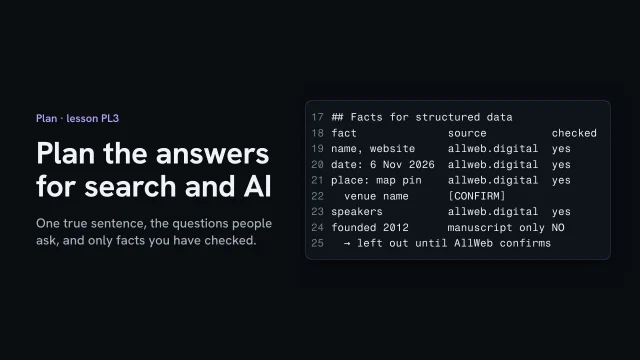
1name, website · allweb.digital · yes
2date 6 Nov 2026 · allweb.digital · yes
3place: map pin · allweb.digital · yes; venue name [CONFIRM]
4speakers · allweb.digital · yes
5founded 2012 · manuscript only · NO, left out until AllWeb confirms

From the lesson Plan the answers for search and AI · A speculative redesign, not commissioned by AllWeb.

Where yours go: Organize your project, in Prepare.

Full transcript

Search engines and AI answers describe a business from what its pages say plainly. Ask one when this conference is, and it looks for a sentence that says so. So before anyone writes the pages, plan the answers: one description, the questions worth answering, and the facts you can prove.

Start with one sentence that says what the business is, and use it on every page. My strategy draft had one, and it says the conference was founded in 2012. When I checked AllWeb's own site, that year wasn't on it. An answer engine would repeat it as fact, so it stays out. The plan's sentence keeps only what was checked: a one-day conference in Tirana, for people in marketing, business, innovation and creativity.

Next, the questions people actually ask. When is it, where, who's speaking, how much, and can I watch a talk. Each gets a place on the page, written so the answer comes first. Then decide what gets nothing. The draft allows a page per talk only where a video exists. An empty page doesn't answer anyone.

Structured data is a block in the page's code that states facts for machines: the event's name, date, place and speakers. The draft's rule is short. Include only verified. So list each fact, where it came from, and whether you checked it. The founding year gets a no, and stays out. The venue's name gets a confirm marker, because the source is only a map pin.

Here's the built page's source. The organization block has no founding date. The event block carries the same sentence, the date and the place. Two things in the plan aren't built yet: the FAQ data and the video data. The plan says so, so nobody assumes they shipped.

Search engines and AI repeat what your pages say. Give them one true sentence, plain answers to real questions, and only the facts you've checked.

Questions worth answering
  • When, where, who, how much
  • The answer comes first
  • Talk pages only with a video
  • Empty pages answer no one

Sort wishes into requirements

Tag every request by what breaks on launch day without it: needed before work starts, needed before launch, or later. Give each tag a reason, then send the client one specific ask for each missing thing.

What you’ll make

Before you start
The brief’s draft and the interview record.
You’ll learn
Tagging each request blocks start, blocks launch or later, with a reason, and sending specific asks.
You’ll make
A requirements list and a dated list of asks.
Worked example
The bakery’s requirements
Used next
Build (what’s in), the pre-send gate (before-launch lines), Improve (later items).

My requirements

Ask of each request what breaks if it’s missing on launch day.

Before work starts: you can’t plan without it. Before launch: build with a marked placeholder, but don’t go live. Later: real, but not this launch.

Request 1
Request 2
Request 3
Request 4

Copy or download your answers before you leave this page.

Asked for firmly isn’t the same as needed. Once you’ve tagged the list, ask AI to argue each “before” tag down to later; keep the ones it can’t move.

Done when every request has a tag and a reason, and everything needed before launch is on a dated list of asks to the client.

More

Example project files
Requirements, tagged
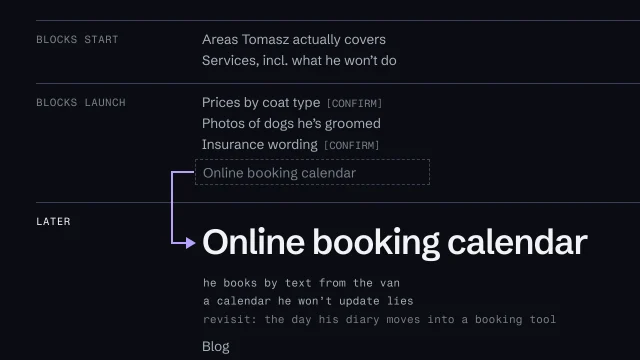
1BLOCKS START Areas Tomasz actually covers
2BLOCKS START Services, incl. what he won't do
3BLOCKS LAUNCH Prices by coat type [CONFIRM]
4BLOCKS LAUNCH Photos of dogs he's groomed
5BLOCKS LAUNCH Insurance wording [CONFIRM]
6LATER Online booking calendar
7LATER Blog
The request list sent to the client
11 Every postcode area you cover, and any you won't
22 Your prices, exactly as you quote them by text
33 Ten photos of dogs you've groomed, owners' OK
44 Your insurance certificate, so we quote it right
55 Your business's registered name
6Please reply by 10 October

Example: a fictional mobile dog groomer who books everything by text. The tags read BLOCKS START, BLOCKS LAUNCH and LATER. From the skill Turn wishes into requirements.

The lines needed before launch double as the launch checklist: each sits in the build as a marked placeholder until the real thing arrives.

Where yours go: Organize your project, in Prepare.

Full transcript

After the interviews you've got a pile of requests: facts you need, features, moods. You have to decide what to ask the client for, and what you can safely leave out. Get it wrong and the launch slips, usually waiting on something nobody needed.

That's the requirements list. Every request gets a tag, and every tag gets a reason in a few words. If there's no reason, it gets no tag.

BLOCKS START means you can't plan the site without it. Which services the business really offers, where it works, who the site is for. Get those wrong and every page after them is wrong. BLOCKS LAUNCH means you can build with a visible placeholder, but the site can't go live until the real thing arrives. Prices, real photos, the legal business name. LATER means it's a real request, worth doing, and outside this launch. It's written down with its reason, so the client knows they were heard.

Here's one for a fictional mobile dog groomer. Tomasz drives a van and books everything by text. Areas and services block the start, because the whole site hangs on them, including what he won't do. He doesn't take very large breeds, and the site has to say so. Prices, photos and his insurance wording block launch. Each sits in the build as a placeholder, marked so nobody could mistake it for the real thing. And the online booking calendar is LATER. Here's why.

In the interview his partner said, more than once, that they must have online booking. Said that firmly, it's tempting to tag it BLOCKS LAUNCH. That's the classic mistake: a wish tagged as a requirement because somebody said 'must'. Look at what actually happens. Tomasz books by text between appointments. A calendar he doesn't keep up to date shows slots that don't exist, which is worse than no calendar. So it's LATER, with the reason next to it, and with what would change it: the day he moves his diary into a booking tool.

Ask it of every item. If the answer is that the site can't do its one job, or that it says something untrue, the item blocks. If the answer is that someone's disappointed, it's LATER.

Then turn every BLOCKS item into a request list. That's what you actually send. Each line asks for one thing, in the form you need it. 'Your prices, exactly as you quote them by text' gets you real prices. 'Send pricing info' gets you a brochure from four years ago. 'Photos of dogs you've groomed, with the owners' OK' settles the rights question before it becomes a problem. Short list, specific asks, and a date.

An AI is useful here as an opponent. Once you've tagged the list, ask it to make the strongest case that the site could launch without each BLOCKS item. The ones it can't move are your real requirements. You still decide, and you write the reason.

The BLOCKS LAUNCH lines are your before-launch list. Copy them into the Go live checklist, so the site can't go out while any of them is still a placeholder. Every line is either real, or the site waits. How to search the built pages for a stray placeholder comes later, in the lessons on checking a build before it goes out.

Tag every request by what breaks without it, give each tag a reason, and send the client a list of specific asks.
“We must have online booking”

A wish tagged as a requirement because somebody said “must”. Tag by what breaks without it, not by how hard it was asked.

Tagged by insistence

  • "We must have online booking"
  • Goes in BLOCKS LAUNCH
  • Launch waits on a feature

Tagged by what breaks

  • He books by text from the van
  • An unkept calendar lies
  • LATER, until his diary moves

Use AI as the opponent

  1. Tag the list yourself first
  2. Ask the AI to argue BLOCKS down
  3. Keep the tags it can't move
On the AllWeb project

For AllWeb, the next ticket price is unknown. On a commissioned site, that would hold up launch.

A speculative redesign, not commissioned by AllWeb.

Decide how you’ll know it worked

Turn the site’s one job into a few questions you could answer three months after launch. For each, write the step a page can count, the number you start from (or “not known yet”), and who reads it, and when.

What you’ll make

Before you start
The site's one action, the audiences, and any baseline you measured on the current site.
You’ll learn
  • Turning the one job into questions you can answer after launch
  • Tying each question to a step a page can count
  • Writing the starting number, or 'not known yet' where there isn't one
  • Naming who reads each number, and when
You’ll make
A How we'll know section in the brief: each question, the step it counts, the baseline, the reader and when, and no invented targets.
Worked example
AllWeb: 'Do visitors reach a ticket button?' counts the five ticket buttons by placement; no before number, so it asks AllWeb. Phone speed starts at 4.7 s (largest element, 5 Oct report).
Check it
Every question names the step it counts and who reads it, every baseline has a date and a source, and no target is made up.
Used next
The brief collects it, and the measurement plan in Improve sets up the tool that counts it.

How we’ll know

Question 1
Question 2
Question 3

Copy or download your answers before you leave this page.

A target with nothing behind it is a guess with a deadline. Where there’s no starting number, say so and ask for one.

Done when every question names the step it counts and its reader, every starting number has a date and a source, and no target is made up.

More

Example project files
brief.md, How we’ll know
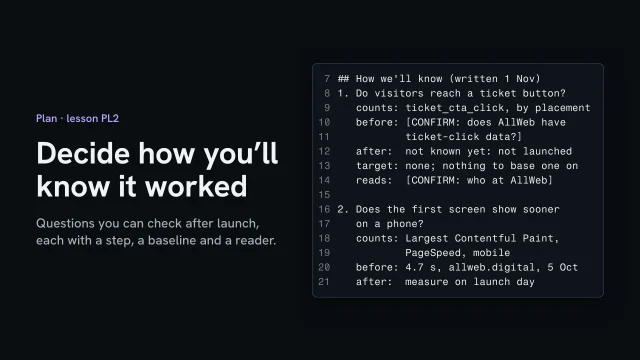
11. Do visitors reach a ticket button? Counts ticket_cta_click by placement. Before: [CONFIRM]. After: not known yet. Target: none. Reads: [CONFIRM]
22. Does the first screen show sooner on a phone? Counts Largest Contentful Paint, mobile. Before: 4.7 s, 5 Oct. After: measured on launch day. Reads: the developer

From the lesson Decide how you'll know it worked · A speculative redesign, not commissioned by AllWeb.

Where yours go: Organize your project, in Prepare.

Full transcript

A brief that can't be checked after launch is a wish list. Three months in, someone will ask whether the site worked. Decide now what you'll look at to answer, while the plan is still on paper.

Start from the site's one job, and turn it into a question you can answer with a yes or a number. Here the job is selling tickets, so the question is: do visitors reach a ticket button? Then name the step that answers it, something a page can count. The build already names it. All five ticket buttons carry the same event name, and each says where it sits. Here's the honest part. On this concept the buttons are demos, so a click stops there and nothing is counted. Real counting waits for an analytics tool and the visitor's consent.

Next, the starting number. For speed there is one. On the fifth of October, the old site's largest element took 4.7 seconds to appear, on a simulated phone over a slow connection. For tickets there isn't one I can show, so the brief asks, and says not known yet. And no target. A target with nothing behind it is a guess with a deadline.

Last, who reads it, and when. On a speculative build that's the client's call, so it's a confirm marker too. In Improve, this list becomes the measurement plan, and that's where the tool gets set up.

Before launch, write each question you'll check, the step it counts, the number you start from, and who reads it. Where there's no number yet, say so.

Scope and exclusions

Write what this version includes and what it leaves out, naming everything someone might assume is included. Add rough milestones with dates you can show, and say who decides when something new is asked for.

What you’ll make

Before you start
The requirements list and the brief's one job, so you know what the site must do before you say what it won't.
You’ll learn
  • Writing what this version includes
  • Naming every exclusion someone might assume is included
  • Giving milestones dates you can show
  • Saying who can move something from out to in
You’ll make
A scope sheet: in scope, out of scope (and where each item goes instead), who decides, and a milestones table.
Worked example
AllWeb (speculative): one homepage concept at desktop and phone width. Out: ticket sales (the buttons are demos), the other 15 planned pages, analytics, a new logo, an Albanian version.
Check it
Every exclusion someone might assume is named and checked against the build, every milestone has a date or what it waits on, and it says who decides.
Used next
The one-page brief points to it, and Build works only inside it. A new request goes on this sheet before anyone builds it.

Scope and exclusions

In scope

Out of scope

Who decides

Milestone 1
Milestone 2
Milestone 3
Milestone 4

Copy or download your answers before you leave this page.

Anything not written in scope is out of it. When someone asks for more, it goes on this sheet first, with who decided, before anyone builds it.

Done when every exclusion someone might assume is named, every milestone has a date or what it waits on, and it says who can move something from out to in.

More

Example project files
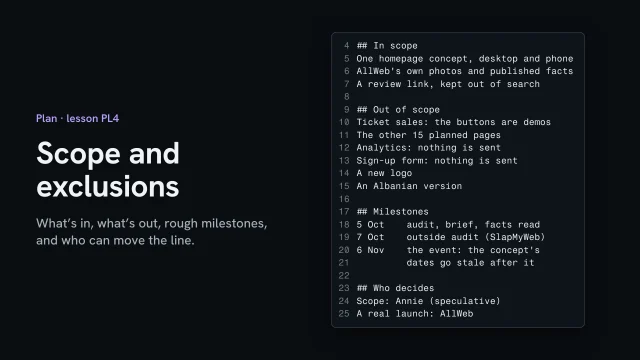
scope.md, in scope
1One homepage concept, desktop and phone
2AllWeb's own photos and published facts
3A review link, kept out of search

From the lesson Scope and exclusions · A speculative redesign, not commissioned by AllWeb.

Where yours go: Organize your project, in Prepare.

Full transcript

Scope is the line around the work: what's in, what's out, roughly when, and who can move the line. Write it before you build, so a request that turns up later has somewhere to go.

This redesign is speculative, so its scope is small. One homepage concept, at desktop and phone width. AllWeb's own photos and published facts. And a review link, kept out of search.

Out of scope matters more. Name everything someone might assume is included. Ticket sales aren't: the ticket buttons are demos. One search counts eighteen demo links on the page, and the sign-up form says nothing was sent. Analytics, the other fifteen planned pages, a new logo and an Albanian version are out too. The brief already said what it wouldn't do, so the scope just carries it over.

Then rough milestones, with dates you can show. The audit and the brief are dated the fifth of October. An outside audit ran on the seventh. The event is on the sixth of November, and after that the concept's dates go stale. Last, who decides. On a speculative project, you do. For a real launch it's the client, and nothing moves from out to in without their yes.

Write what's in, name everything that's out, give the milestones you can show, and say who can move the line.

Out of scope, named
  • Ticket sales: demo buttons
  • Forms and analytics send nothing
  • 15 more pages, a logo, Albanian
  • Carry over the brief's 'not'

Write the one-page brief

Put the decisions on one page: the site’s one job in a sentence, what has to change, what the site must never say, and how it will be judged. Wishes stay out until a goal asks for them.

What you’ll make

Before you start
Everything from Research and Plan.
You’ll learn
A one-page brief: purpose, sources, do-not, checkable outcomes and sign-off checks.
You’ll make
The one-page brief.
Worked example
The bakery’s brief: it rests on the interviews with the owner and the head baker, the research files, and the reviews.
Used next
Every later phase; Test reviews the build against it.

The brief

Purpose

Scope and limits

Outcomes

Judged

Under the page, list what it rests on: your interview notes, your research, anything the client sent.

Copy or download your answers before you leave this page.

Write it from your research and interviews, before any design. If it runs past one page, you’ve started designing inside it.

Done when the brief fits on one page, every goal could be checked three months after launch, and someone could fail the finished site against it.

More

Goal or wish?

Three months after launch, could you tell whether it happened? If yes, it’s a goal. If not, it’s a wish, and it waits.

Wish: what was asked

  • Make it look modern
  • Social feed on the homepage
  • A gallery of every frame

Goal: what must change

  • More commissions start online
  • Price range known up front
  • Fewer calls about hours

Using AI on a brief, in this order

  1. Write your own draft first
  2. Ask the AI to tag each line
  3. Read every tag and decide
Example project files
The brief (part)
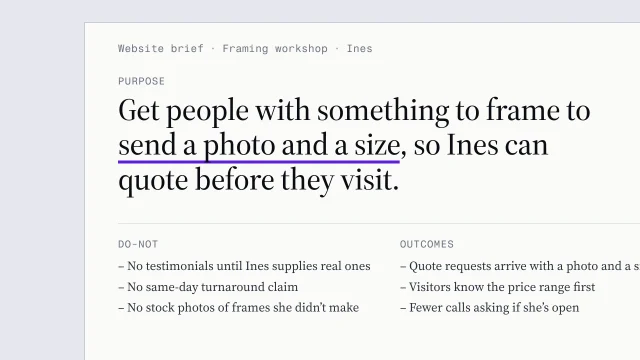
1PURPOSE
2Get people with something to frame to send a photoOne action
3and a size, so Ines can quote before they visit.
4SOURCES
5- Interview notes with Ines
6- Inventory of what's already online
7- Anything Ines sent us
8DO-NOT
9- No testimonials until Ines supplies real onesTruth rules travel
10- No same-day turnaround claim
11- No stock photos of frames she didn't make
12OUTCOMES
13- Quote requests arrive with a photo and a sizeAn outcome QA can count
14- Visitors know the price range before they visit
15- Fewer calls asking about opening hours
16JUDGED
17- Ines signs off, against three checks:
18 the first screen makes the one job obvious;
19 a photo and a size sent from a phone in under a minute;
20 Ines supplied every claim on the page

The five parts, on one page

  1. Purpose: the one job, and why now
  2. Sources: what the brief rests on
  3. Do-not: what it must never do
  4. Outcomes: changes you'll check
  5. Judged: who decides, against what

Example: a fictional picture-framing workshop. From the skill Write a one-page website brief.

Every later phase reads the brief, and the quality checks judge the finished site against it.

Where yours go: Organize your project, in Prepare.

Full transcript

Most site projects go wrong before the first sketch. The client describes a feeling, the designer hears a feature list, and nobody writes down what the site is for. A one-page brief fixes that. It's the first thing I write after the interviews.

A brief names what has to change for this business once the site exists. It doesn't pick colors or fonts or a template. If you catch yourself writing about how the site looks, you've jumped ahead, and later you'll be defending a style nobody agreed to.

Take a fictional framing workshop. Ines runs it on her own. She asked for a modern look, her social feed on the homepage, and a gallery of every frame she's ever made. Those are wishes: none of them says what should happen. Underneath, she loses evenings answering calls about opening hours, people walk out when they hear the price, and she wants commissions to start online so she can quote from a photo. Each of those is a change you could check. My test: three months after launch, could I tell whether it happened? If yes, it's a goal. If not, it's a wish, and it waits until a goal asks for it.

Before the full brief, write one sentence: the site's one job. For Ines it's this. Get people with something to frame to send a photo and a size, so she can quote before they visit. One line forces a choice. If you need two sentences, you've got two sites, and one of them will lose.

Then the page itself, in five parts. Purpose is the one job and why it matters now. Sources lists what the brief rests on: the interview notes, the inventory of what's already online, anything the client sent you. Do-not is what the site must never do. Outcomes are the goals, written so you could check them. And the last part says who signs the site off, and against what. Keep it to one page. If it runs longer, you've started designing inside the brief.

Here's hers, a line per part. Look at the do-not list, because that's where a brief earns its keep. No testimonials until Ines gives us real ones. No same-day turnaround, because some jobs take her a week. No stock photos of frames she didn't make. An AI will write every one of those if you don't forbid it. Ask for a framing site and it reaches for 'trusted by hundreds of happy customers', because that's what framing sites say. The do-not block stops it before it starts.

You can use AI here, after you've written your own draft. Ask it to tag each line goal or wish, and say how you'd check each goal after launch. It's good at catching a feeling dressed up as an outcome, and it wasn't in the room, so you make every call.

The part people skip is how the site will be judged. Write the checks now, while nobody's attached to a design, and write each one so a stranger could run it and get the same answer. Does the first screen make the one job obvious? Can someone send a photo and a size from their phone in under a minute? Did Ines supply every claim on the page? Here's a check like that being run, on the bakery's site from this course. Is ordering ahead on the first screen of a phone? At three-seventy-five wide, it's there in the header, so anyone who looks gets the same answer: yes. At the end you review the build against these lines, and so does Ines. That's what a brief is for. It can say no.

Write down what has to change, and how you'll know it did, before anyone opens a design tool.

Common strategy mistakes
  • Make it look modern: Designing before the goal is written. Write what has to change first. A brief that talks about fonts has jumped ahead.
  • Something for everyone: Writing for everyone. Name who the site is mainly for. Everyone else still gets served, further down the page.
  • “We must have online booking”: Treating a feature request as a need. Ask what breaks on launch day without it.
  • The fastest turnaround in the city: Claims nobody can prove. If you can’t prove it, narrow it or leave it out.
  • Book · Buy · Join · Follow: Buttons competing for the first screen. One action leads. The rest stay on the site, lower down.
  • A twelve-page site: Launching everything at once. Sort every request by when it’s needed. Scope in kinds of page, not pages.
  • Traffic is up: Counting visits instead of outcomes. Count the change the goal named.
  • “What makes this shop special?”: Letting AI make the call. Draft it yourself, then use AI to argue with your draft.
On the AllWeb project

AllWeb’s brief is the redesign’s BRIEF.md: the concept, the facts used and their date, and what the site won’t claim. A brief can become a proposal: A proposal in the client's own branding.

A speculative redesign, not commissioned by AllWeb.