Improve

Decide what to measure, check how your website is working, keep its information accurate, make one improvement at a time, and hand it over when needed.

0 / 8 complete

Starts with
Signed gate, QA record, Objectives, Claims list, Accounts list
Produces
Launch record, Check routine, Claims kept current, Handover, Decision log
Feeds into
The client

Production Checklist

  1. Video, 1:35 Introduction to Improve Introduction
  2. Video, 4:03 Go live Makes: Launch record
  3. Video, 3:26 Decide what to measure Makes: Measurement plan
  4. Video, 3:47 Set a check routine Makes: Check routine
  5. Video, 3:22 Read Search Console without fooling yourself Optional
  6. Video, 1:47 Back up, and try the way back Makes: Backup and rollback
  7. Video, 3:13 Keep claims true over time Makes: Living claims list
  8. Video, 3:57 Change one thing, then read it Makes: Change log
  9. Video, 2:42 Hand the site over Makes: Handover pack
  10. Video, 1:21 Write the case study and decision log Makes: Case study

Where the path ends

A live website you’ve checked against your brief, plus every document behind it.

Each task leaves a deliverable: 72 across the eight phases, kept in their worksheets.

Start another project

Worksheets hold one project at a time, signed in or not, so download the kit before you start the next one. How Projects work

Your ticks are your own record of your learning. A project’s tasks are marked done on its page in Projects. See your worksheets

Read Search Console without fooling yourself

Read each page's queries against its job, and tell a real drop from noise.

More

Full transcript

Google will tell you, in its own numbers, how your site turns up in its search results. Those numbers are easy to read wrong, and then you go and change something that was fine.

Start with what the four numbers mean, because Google's definitions are narrower than they sound. An impression means a link to your site appeared on a page of results. It counts even if nobody scrolled down to it, though inside a carousel it has to be scrolled into view. A click is a click through to your site. Click-through rate is clicks divided by impressions. And position is the highest spot your site held on that page, averaged across impressions.

That average fools people most. Show up at position two once and position three once, and the report says two and a half. Now picture a new site with twelve impressions a month. The average will swing every week on a handful of searches. Google's own guide says not to focus too much on absolute position, and calls impressions and clicks the measure of success. On a small site, read position as a rough hint, over months.

The useful reading is page by page. Filter the report to one page and read the queries that brought it impressions. Then open the sitemap, where every page has one job and the search intent you planned it for. Do the queries fit the job? If a class page keeps appearing for people who want to buy pottery, the visitors are arriving at the wrong page, and the fix is in the copy or the sitemap. A ranking trick won't touch it.

Here's that reading for a fictional pottery studio's beginner class page. Two queries match its job exactly. One belongs to a shop the studio doesn't run, so check the page isn't promising something it doesn't sell. One is a gap: people looking for a children's workshop. That's a question for the owner. You don't add a page because a query appeared. And the list is never complete, because Google leaves out queries that are too rare or too private to report.

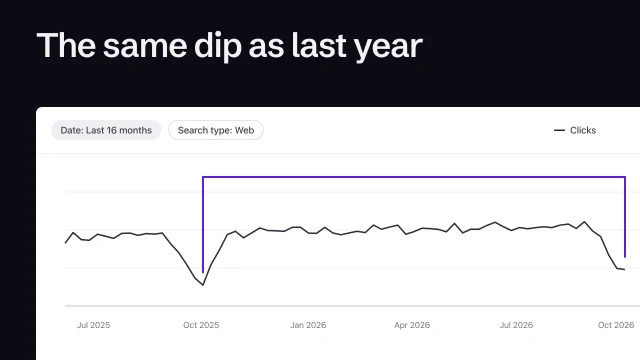
When the numbers fall, follow Google's guide to traffic drops, which is frank about noise. Small moves in position happen all the time, and Google advises against radical changes to a page that's already doing well. First, look at the same weeks last year: the dip may come around every year. Then find the pages that lost the most clicks. If a few big queries fell, check whether people stopped searching for them everywhere, which has nothing to do with your site. A drop straight after a change points at you: a page hidden from search, a broken page, a moved address.

One pattern has a specific cause. If impressions hold steady and clicks fall, people still see the result and choose something else. Google suggests looking at the page's title and snippet, or at whether another site now has a richer listing. That's one change you can make and then judge fairly.

How often? Google says there's no need to sign in every day. It emails you when it finds a new issue, and suggests checking around once a month, or when you change the site's content. Google also publishes its own walkthrough of the report, if you want to see where each number sits. Make it a monthly read, one page at a time, and end it by writing down what you'll do. 'Nothing this month' is a valid entry, and it's often the right one.

Read queries against each page's job, treat small numbers as small, check last year first.

Introduction to Improve

Starts with
Signed gate, QA record, Objectives, Claims list, Accounts list
Produces
Launch record, Check routine, Claims kept current, Handover, Decision log
Feeds into
The client

Go live

Point the domain at the new site without breaking what it already does: copy its records first, change only the website’s, and leave the email alone. Give every old address a permanent redirect, then run the go-live gate on the real address.

What you’ll make

Before you start
A signed pre-send gate, the review build, and access to the domain’s settings.
You’ll learn
  • Copying every record before you touch one
  • Changing only the website’s records and leaving the email’s alone
  • A permanent redirect for every old address, the host’s own included
  • Running the go-live gate again on the real address
You’ll make
A launch record: the saved records, what changed, the redirect map and the signed gate.
Worked example
The bakery goes live: the first run of the gate failed on noindex, the sitemap and the share picture; switching the build to live fixed all of them.
Used next
The measurement plan and the check routine start from the live address.

Going live

Before you change anything

After the change

The go-live gate, on the real address

Every old address, and where it goes now

Make each one a permanent (301) redirect, including the host’s own address.

Old address 1
Old address 2
Old address 3
Old address 4

Copy or download your answers before you leave this page.

If the host offers to take over the domain’s name servers, copy the mail records across first: new name servers start empty, and the email stops arriving.

Done when the go-live gate passes on the real address, mail still arrives, and every old address lands somewhere real.

More

Example project files
What the domain answers after the change
1$ dig MX furra-gjyshes.test +short
210 mx1.mailhost.test.
320 mx2.mailhost.test.
4$ dig TXT furra-gjyshes.test +short
5"v=spf1 mx ~all"
6$ dig A furra-gjyshes.test +noall +answer
7furra-gjyshes.test. 3600 IN A 198.51.100.20

From the skill Go live without breaking anything · fictional client

HTTPS on the real address
1$ curl -sI http://furra-gjyshes.test/ | head -2
2HTTP/1.1 301 Moved Permanently
3Location: https://furra-gjyshes.test/
4subject: CN=furra-gjyshes.test
5SSL certificate verify ok.

From the skill Go live without breaking anything · fictional client

Asked from a command line on the lesson’s stand-in domain. A DNS lookup site and a browser show the same answers.

Where yours go: Organize your project, in Prepare.

Full transcript

The owner has signed off, and today the site goes live on the shop's own domain. That domain already does other jobs: it carries the shop's email, and old links point at it. Going live means moving the website without breaking any of them.

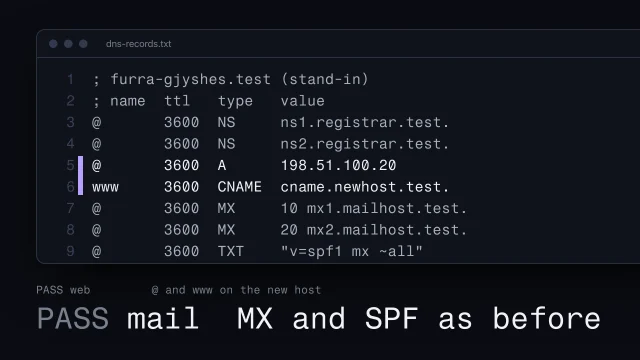
Everything here runs on this computer: this file stands in for the domain's settings, and a local server plays both hosts. Two records send the website to the old host. Two say where the shop's mail goes, and one says who may send it. Before you change anything, save a copy of the whole list. If something breaks, the copy is how you put it back.

Then change only the two web records, to the values the new host gives you: the domain's address, and www. Compare with the copy. Two lines changed. The mail lines are exactly as they were. One trap. Some hosts offer to take over the domain's name servers, these two lines. New name servers start empty, so copy the mail records across first, or the shop's email stops arriving.

Now ask the domain, the way a mail server would. Same two mail servers, same order, same sending rule. And the website's address is the new host. Each answer can be remembered for an hour here. Until then, some visitors, and your own computer, may still see the old site. Check from a phone off wifi before you call it broken.

The host then gets a certificate for the domain, usually within minutes. Check it: plain http redirects to https, and the certificate names this exact domain. Here it's from a stand-in on this computer; on the real address, the browser shows no warning.

Next, old addresses. The old site's menu was a picture, at its own address. On the new host, that address is not found. So write a redirect map: every address that used to work, and where it goes now. The menu picture goes to today's bread, the page that does its job now. The www name, the host's own address and the review link all go to the domain. Make each one a 301, a permanent redirect, so browsers and search engines carry links and results across. Then ask every old address for its answer. Don't skip the host's own address. It serves the same site, so without a redirect it competes with your domain in search.

The old host still shows the old site at its own address, with the wrong hours. Keep a copy, then take it down. Here, that means moving it off the stand-in host, into the archive. Now that address answers not found.

Now run the go-live gate on the real address. Five lines pass. Four fail, the ones people forget: the live site still tells search engines to stay away. Don't fix that page by page. Flip one switch to live and rebuild. The noindex tag and header go, every page gets its own address, and a sitemap is written. The build also sets the share picture, with its full live address. Get that right before anyone shares the link, because chat apps often keep the first card they see.

Then run the whole gate again, from the top. Every line passes, on the real address. Look for yourself in a fresh private window, since your own browser remembers the old site. The new hours are there. Sign it with your name, the date and the version that passed. The shop's email still arrives, and every old link lands somewhere real.

Move only what the website needs, keep everything else, and prove it on the live address.
If you own, make or teach this site
If you own or pay for the site
You decide who looks after the site once it’s live, and which questions its numbers have to answer. Ask to see the check routine with that person’s name on it, and the log of what was changed and why.
If you make it
You set up the checks that run on every deploy, and write down the ones a person has to do. Check that nothing personal reaches the analytics, and that every claim carries the date it was last checked.
If you teach it or run a program
Practice reading one page’s search queries against its job: match, misfit or gap. Assess a change by its log entry. Was the hypothesis written before the change, and does it say how sure anyone is?
Review build and live build

Review build

  • noindex in every page
  • noindex header
  • No sitemap

Live build

  • No noindex anywhere
  • Each page: its own address
  • Sitemap of the real pages

Decide what to measure

Before any tracking goes in, write down the few questions the owner needs the numbers to answer. Count only the steps that answer them, and nothing that could identify a visitor.

What you’ll make

Before you start
A launched (or launching) site and the brief’s goals.
You’ll learn
Questions before tracking, a few counted steps, nothing personal, leaving your own visits out, what the plan allows.
You’ll make
A measurement plan.
Worked example
The bakery’s measurement plan: fictional example. No numbers yet: the site has just launched.
Used next
The check routine and change log.

My measurement plan

Copy or download your answers before you leave this page.

Whether the site needs a consent banner is a legal question for someone qualified, not a setting.

Done when each question names the step that answers it and who reads it when, and nothing on the list could identify a visitor.

More

The continuing example: AllWeb

AllWeb’s redesign already counts visits: it loads the host’s visitor counter from its own address, which sets no cookies and stores nothing (checked 1 November 2026). A full plan would start from the questions the site has to answer and the one action it exists for: tickets.

Example project files
## What we measure · the bakery (fictional)
1Action (brief): order bread ahead for pickup
2Q1 How many orders ahead come in each week?
3Q2 How many loaves sell out each week?
4Q3 How many calls ask about the hours?
5Q1 counted: order_started, order_sent (once received)
6Q2 the daily bread list, not analytics
7Q3 the owner's tally by the phone, not analytics
8Never sent names, phone numbers, anything typed in the form
9Read by the owner, first Monday of each month

From the skill Decide what to measure before launch · fictional client

A section of the handover file, from the lessons’ fictional studio. The event names are what the analytics tool records.

Where yours go: Organize your project, in Prepare.

Full transcript

Most sites get analytics the same way. Someone pastes a tag in on launch day, and six months later there's a dashboard full of numbers that nobody has asked a single question of.

So do it in the other order. Before launch, write down what the site's owner actually needs to know. Then track only what answers it. A number nobody will act on still costs something. It takes setup time, it asks the visitor for data, and it adds noise around the numbers you do care about.

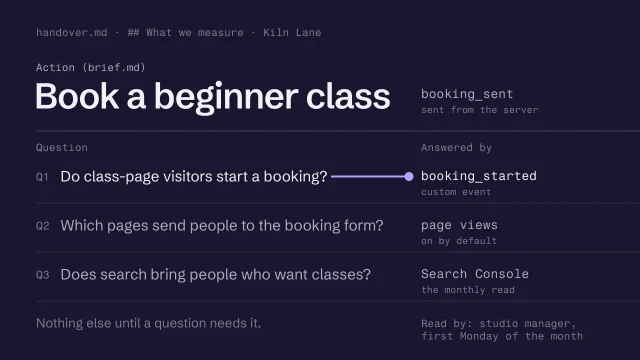
Here's the section for the bakery. Its brief names one action: order bread ahead for pickup. So the owner's questions are about that. How many orders ahead come in each week? How many loaves sell out? How many people still call to ask the hours? Each question gets the step that answers it, and only the first needs analytics. Sold-out loaves come from the daily bread list, which the owner already edits each morning. The calls come from a tally the owner keeps by the phone. And there's a line saying who reads this and when, because a question nobody reads is decoration.

Most analytics tools record page views without being asked. On top of those, count a few milestones on the way to the action. Order started. Order sent, counted only once the order has actually been received, so a form that failed doesn't count as an order. If your tool can record that from the server, use it. Then stop. Twenty events with no question attached is how a dashboard stops being read.

Then the rule that doesn't bend: nothing personal goes in. Google's rules for its own analytics forbid anything that could identify a person, and name email addresses and phone numbers. They also say page addresses and titles are where it leaks most often, so look at what the order confirmation page puts in its address. Most tools let you rewrite or drop an event before it leaves the browser. Use that to strip anything personal first.

Next, take yourself out of the numbers. Before launch you'll load the site a hundred times, and so will the owner. Every analytics tool has a way to leave those visits out, by marking your browsers or by address. Use the one its documents describe, and watch it on a few visits before you rely on it. Some tools never process visits a filter has excluded, so a filter set up wrong loses data you can't get back.

Now check the plan, because it decides what's possible. Some plans count page views and nothing else, so check that custom events are included at all. Check how many events a month the plan allows, and what happens when they run out: some tools simply stop collecting. Check how far back the reports reach. Then write the limits into the file with the date you checked, so nobody designs a measurement the plan can't take.

Last, read what the tool you chose says it stores: whether it sets cookies, how it tells one visitor from another, and how long it keeps that. That's a claim about one tool, from its maker, so the file links to the tool's own privacy page instead of repeating it. Whether the site needs a consent banner is a legal question for someone qualified, and the answer can change the moment you add a second tool.

Write the questions before the tracking. Count only what answers them, nothing personal.

In Vercel Web Analytics and GA4

Taking your own visits out, in these two tools

  1. Do it before launch
  2. Your browsers and the owner's
  3. Use the method your tool documents
  4. Check it catches the right visits

What their plans allowed when the lesson checked (6 October 2026)

  • Are custom events included?
  • How many events a month?
  • What happens at the limit?
  • How far back do reports go?
  • Write the limits down, dated

Read the provider’s current page before you rely on a limit.

What leaks, and what’s safe to send

Leaks personal data

  • An email in the page address
  • A customer's name in an event
  • An order number in the path

Safe to send

  • /thanks, with nothing after it
  • order_sent, loaf: Seeded rye
  • /order/[id], stripped first

Page addresses and titles are where personal data leaks most often, so look at what your thank-you page puts in its address.

From the skill Decide what to measure before launch · fictional client

Tools for this
  • Plausible (opens in a new tab): Page views and where visitors came from, if Google's analytics is more than the site needs. Read what it collects on its own privacy page before you describe it to anyone.
  • Umami (opens in a new tab): The same job, and you can host it yourself. Whichever you pick, write the questions first and track only what answers them.

Every tool here is made by someone else. Aesthetary isn't affiliated with any of them, and listing one doesn't mean its maker endorses Aesthetary.

Set a check routine

Put every check on a trigger so nobody has to remember it: after each change goes live, once a month, and when something particular changes. Write the name of the person who runs it beside the routine.

Also in this task

Make a routine change without breaking it 3 min

The lesson’s own page, with its transcript

What you’ll make

Before you start
The pre-send gate and the measurement plan.
You’ll learn
Every check on a trigger (each change, monthly, particular changes), a budget, and a named person who agreed.
You’ll make
A check routine with a name on it.
Worked example
The bakery’s check routine: fictional example. Nothing has been run yet, so nothing is reported.
Used next
Handover.

My check routine

On a trigger

Who and when

Copy or download your answers before you leave this page.

Some of these can run by themselves in your builder or host; write them down anyway, so the next person knows they exist.

Done when every check from your pre-launch list has a trigger, and the routine names a person who has agreed to run it.

More

Worked example: Kiln Lane’s year on one page, and the check routine behind it
  • runs by itself once set up
  • a person, on a date
  • no date: waits for something to happen

At launch: launch week, the first seven days of October

Regularly: the deploy checks run by themselves all year; a person reads the numbers on the first Monday of every month from November

When content changes: no date: whenever something changes

When problems occur: no date: when the numbers fall

When evaluating improvements: one change on 4 November, four weeks before compared with four after, read on 2 December and again in February

Kiln Lane, a fictional pottery studio: its first year after launch, October to September, in the five moments when something falls due. Every line comes from the Improve skills; the dates are their examples’ dates. Most months hold only the first-Monday read, and “nothing this month” is a real entry.

On every deploy: the speed budget

lighthouserc.js
1module.exports = { ci: {
2 collect: { staticDistDir: './dist' },
3 assert: { assertions: {
4 'largest-contentful-paint': ['error',
5 { maxNumericValue: 2500, aggregationMethod: 'median' }],
6 'cumulative-layout-shift': ['error',
7 { maxNumericValue: 0.1, aggregationMethod: 'median' }],
8 } },
9 upload: { target: 'filesystem', outputDir: './lhci-report' },
10} };

Largest contentful paint (when the biggest thing on the page appears) under 2.5 seconds, layout shift under 0.1: Google’s good thresholds for two of the

Google’s three measures of how fast a page loads, responds and holds still

In the glossary →. “error” fails the build, and the median of three runs is used, because Lighthouse results vary. The placeholder search and a link check run on the same trigger.

Every month: real visitors, and often no data

  • Search results, page by page
  • Real visitors' speed, if any
  • A test order reaches the inbox
  • Updates and renewals due?
  • Is the named person still right?

Chrome only reports real visitors’ speed for pages that are public, indexable and busy enough, and Google doesn’t publish the threshold. It counts only Chrome users who share usage statistics, and nothing from Chrome on iPhones. On a small site, no field data is the normal result.

When something changes: re-run what it touched

When this changes

  • Copy, prices or hours
  • A new page or section
  • Layout, fonts or images

Re-run

  • Claims list, marker search
  • The whole pre-send gate
  • Every width, and speed

From the skill Set a post-launch check routine · fictional client

Tools for the routine

Every tool here is made by someone else. Aesthetary isn't affiliated with any of them, and listing one doesn't mean its maker endorses Aesthetary.

The continuing example: AllWeb

Search reporting needs a real site that search engines may list. AllWeb’s redesign is a concept kept out of search, so the Search Console tutorial uses a fictional studio.

For the changes the routine is checking after: Make a routine change without breaking it.

Example project files
## Check routine · the bakery (fictional)
1Each change speed budget, marker search, links
2Monthly search, real speed, a test order,
3 updates and renewals, names
4Hours/prices claims list + marker search
5New page the whole pre-send gate
6Layout/fonts/images every width + speed
7Owner edits the bread list and hours;
8 does the monthly read
9Nephew anything structural, and the
10 checks after it
11Agreed both, in writing
12Last run not yet; first monthly read 2 Nov

From the skill Set a post-launch check routine · fictional client

The routine as a section of the lessons’ fictional studio’s handover file. CWV is Core Web Vitals, Google’s measures of real visitors’ speed.

Where yours go: Organize your project, in Prepare.

Full transcript

Launch day is the most carefully a site will ever be checked. Then someone edits a page, a photo goes up at full size, a template changes, and nobody runs the gate again.

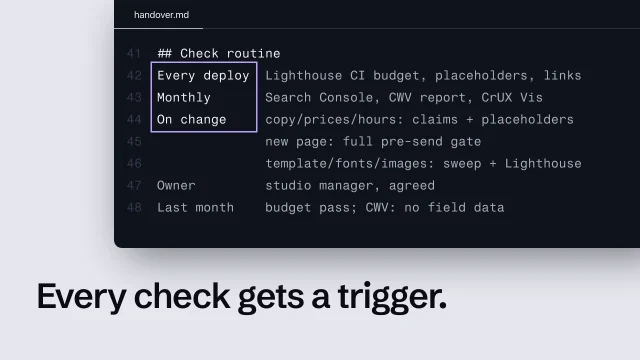
Nobody publishes a routine for after launch, so build one. Every check from your pre-send gate goes on one of three triggers: after each change goes live, every month, or when a particular thing changes. Add the checks launch day didn't need: software updates, renewals, and whether the order form still delivers. Once a check has a trigger, nobody has to remember that it exists. They only have to notice the trigger, and many triggers can be automated.

After each change, let a machine do it. An automated check that runs on every change can load the pages a few times and fail when a result crosses a line you set. That line is a budget. Take it from Google's good thresholds, the ones from the speed lesson: two and a half seconds for the largest content to appear, and point one for layout shift. Keep the search for leftover confirm markers here too, and a link check, because both break quietly. With no automated pipeline, run the same checks by hand against the same budget.

Here's that budget written as a settings file for one widely used checker. It asserts two numbers, and 'error' means crossing either one fails the change. It takes the median of several runs, because speed results vary from run to run. And it keeps the reports in a folder on your machine instead of at a public link. The tool demo sets it up step by step. Whatever runs it, a budget is a lab number. It tells you a change made things worse, which is its job here. It can't tell you what real visitors felt.

Monthly is for what only time shows. Read the search results one page at a time. Look at real visitors' speed: Google groups similar pages and labels each group good, needs improvement or poor, from the last twenty-eight days of Chrome data. Send a test order, marked as a test, and see it arrive, because a form can stop delivering without anyone noticing. Install the updates the site's software needs, and look for anything renewing soon, the domain above all. Then check the person named on the routine is still the right one.

Most small sites will look for that speed data and find nothing, and that's expected. Chrome's data only includes pages that are publicly indexable and get enough visitors, and Google doesn't publish the threshold. It only counts Chrome users who share usage statistics and sync their history, and nothing from Chrome on iPhones. So no data means neither good nor bad. Record it as no field data, and lean on the lab budget and a test on a real phone.

The third trigger is change. Some checks are too slow or too human to run every time, but they're cheap once you know what moved. Edited copy, prices or hours means the claims list and the marker search again. At the bakery, the owner is the one who knows when the hours change. A new page means the whole pre-send gate, as if it were a launch. A change to the layout, the fonts or the images means every screen width again and a speed check, because those changes reach every page at once.

Write the routine into the handover file, with a name beside each part, and get each yes in writing. Here's the bakery's. The owner edits the bread list and the hours herself, so she does the monthly read. Her nephew builds websites, so he's called for anything structural and runs the checks after it. The first monthly read is on the second of November. A routine without a name on it stops the month you move on to the next client.

Put every check on a trigger and a person who agreed. Expect no field data on small sites.

Standards Improve is checked against (12)

Aesthetary's own rules here

  • Aesthetary rule A passing automated test is evidence, not approval

Laws are listed so you know they exist: Aesthetary links to the text and doesn't give legal advice. What these are, and every standard, in Resources

Google Search Console tutorial (3 min)

Optional. The task works the same in any tool. Transcript

The four numbers, as Google defines them

  • Impression: your link was shown
  • Click: a visit from the results
  • CTR: clicks ÷ impressions
  • Position: top spot, averaged

The monthly read

  1. Read the alerts when they come
  2. Sign in about once a month
  3. One page at a time
  4. Write down the action, or 'none'

On a new site with a dozen impressions a month, the average position swings every week on a handful of searches. Read it as a rough hint, over months.

What to re-run, and when a drop matters

When this changes

  • Copy, prices or hours
  • A new page or section
  • Layout, fonts or images

Re-run

  • Claims list, marker search
  • The whole pre-send gate
  • Every width, and speed

Probably noise

  • Position 2 to 4, few queries
  • One quiet week
  • The same dip as last year

Worth investigating

  • Impressions and clicks fall
  • Many queries drop far down
  • A drop right after a change

Before you touch anything, check whether the same dip happened at the same time last year. A drop straight after a change points at the site: look for a page hidden from search, a broken page or a moved address.

From the skills Set a post-launch check routine, Read Search Console without fooling yourself · fictional client

Tools for the routine

Every tool here is made by someone else. Aesthetary isn't affiliated with any of them, and listing one doesn't mean its maker endorses Aesthetary.

The speed budget in Lighthouse CI, checked on every deploy
lighthouserc.js
1module.exports = { ci: {
2 collect: { staticDistDir: './dist' },
3 assert: { assertions: {
4 'largest-contentful-paint': ['error',
5 { maxNumericValue: 2500, aggregationMethod: 'median' }],
6 'cumulative-layout-shift': ['error',
7 { maxNumericValue: 0.1, aggregationMethod: 'median' }],
8 } },
9 upload: { target: 'filesystem', outputDir: './lhci-report' },
10} };

Largest contentful paint (when the biggest thing on the page appears) under 2.5 seconds, layout shift under 0.1: Google’s good thresholds. “error” fails the build, and the median of three runs is used, because results vary. Without a build pipeline, run Lighthouse or PageSpeed Insights by hand against the same budget.

From the skill Set a post-launch check routine · fictional client

Back up, and try the way back

List every part the site is made of and where a copy of each lives. Check the copy against the live site, then try both ways back from a bad release before you need them.

What you’ll make

Before you start
  • Save points and history
  • A deployed address
  • A routine change made safely
You’ll learn
  • Listing what a site is made of and where each copy lives
  • Making a copy without keys and checking it against the live site
  • Reading the host's list of deployments
  • Undoing a change with a revert, on a copy
You’ll make
A backup and rollback section in the routine (maintain/routine.md): each part, where its copy lives, how often, when it was checked, and both ways back with the date each was tried.
Worked example
AllWeb's redesign, 1 Nov 2026: 259 files copied without the environment file; the page, styles and script match the live site byte for byte; the host's deployment list read, nothing changed; a labeled practice change reverted on a copy, then identical to the backup.
Check it
Every part has a copy you've checked against the live site, and both ways back have been tried once, with the date.
Used next
Keep claims true over time; the handover lists where the copies live.

Backup and rollback

Copy or download your answers before you leave this page.

Leave keys out of every copy. A copy nobody has checked is a hope, not a backup.

Done when every part has a copy you’ve checked against the live site, and both ways back have been tried once, with the date written down.

More

Example project files
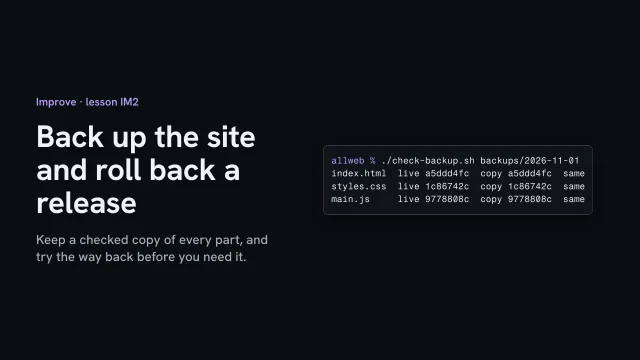
$ find backups/2026-11-01 -type f | wc -l
1259
2$ ./check-backup.sh backups/2026-11-01
3index.html live a5ddd4fc copy a5ddd4fc same
4styles.css live 1c86742c copy 1c86742c same
5main.js live 9778808c copy 9778808c same

From the skill Back up the site and roll back a release · fictional client

Where yours go: Organize your project, in Prepare.

Full transcript

A site you can't rebuild isn't backed up. So list what the site is made of, keep a copy of each part that you've actually checked, and try the way back from a bad release before you need it.

Five things make this site. The code and its history. The words: the page, the manuscript and the brief. The images, and their originals from before the grading. The domain's records, which here belong to AllWeb, not to me. And who holds each account: the host is mine, the domain is AllWeb's.

Copy each part somewhere else, and leave out the environment file, so no keys travel with it. Two hundred and fifty-nine files. Then check the copy against what's live: the page, the styles and the script are the same, byte for byte. A copy you haven't checked is a hope, not a backup.

Now the way back. The host keeps a list of deployments, newest first, and the newest production one is live. If a release goes wrong, an earlier one can be put back in front, from the host's dashboard or its command line, with no rebuild. Here I only list them. Nothing on the live site changes.

The second way: undo the change itself. On a copy under version control, the practice change is the latest save. Revert makes a new save that undoes it, so the history keeps both. Compare with the backup: the same again. The next publish would carry the fix.

Write it into the routine: each part, where its copy lives, how often, and when you last checked it. Then both ways back, and the day you tried them.

Keep a checked copy of every part, and try the way back before you need it.

Keep claims true over time

Give every claim on the live site the date you last checked it and what makes it due again: a change you’ll hear about, or an expiry date. When a source changes, recheck every claim that rests on it before any date moves.

What you’ll make

Before you start
The claims list and the routine.
You’ll learn
Last-checked dates, triggers and expiry dates on every claim, marking dependants stale when a source changes, never moving a date without changing the words.
You’ll make
The claims list with checked dates and due-again rules.
Worked example
The bakery’s claims, after launch: fictional example.
Used next
Handover; every routine change.

Claims, kept current

Claim 1
Claim 2
Claim 3

Copy or download your answers before you leave this page.

Start from the fact check you made before launch, and add two columns. Prices, people, hours and anything “new” go out of date first.

Done when every claim on the live site has a last-checked date and a trigger or expiry date, and no date was changed without rechecking the words.

More

The continuing example: AllWeb

AllWeb’s Early Bird line expires on its own: after 5 October 2026 the page’s script replaces the price with “Early Bird closed on 5 October.” A claim with its date built in.

Example project files

Where yours go: Organize your project, in Prepare.

Full transcript

On launch day every claim on the site can be true. A year later the opening hours have changed, a teacher has left, and the page still says 'new this spring'.

Claims go out of date at different speeds, and you can predict which ones. Prices change. People leave. Opening hours move with the seasons. Awards and memberships have years attached, and some lapse. And any word that points at time, like new, recent, latest or this year, starts going wrong on the day you publish it. Those are the claims to watch.

The claims list you built before launch already holds each claim, its status and its source. Add one more column: the date someone last checked the claim against that source. Without it, a claim checked last week and a claim checked two years ago look exactly the same, and that's how a stale one stays up.

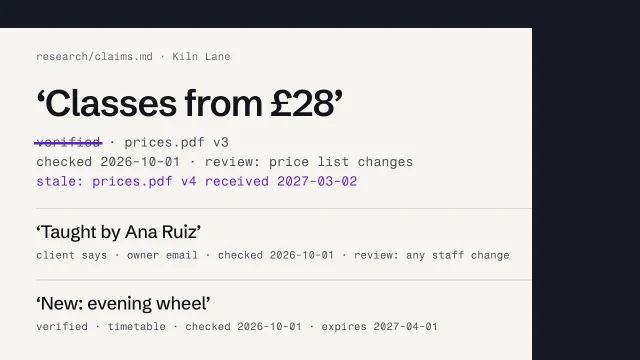
Here are three rows from a fictional studio's claims list. Each now has a checked date and a review rule. For the price, the trigger is the studio's price list changing. For the teacher, it's any change of staff. 'New' gets an expiry date, because new can't stay true forever, and on that date the word comes off or the sentence gets rewritten.

Triggers matter because sources change without telling you. When the price list changes, search the claims list for every claim that cites it, and mark each one stale. Then re-check it, reword it to what the new source supports, or take it down. Only then does it get a new date. A stale mark in the file is fine for a day. On the live page, the claim is simply wrong.

Search thoroughly, because one source turns up in more places than you'd guess. At the bakery, one price is on Today's bread, on the order page, and in the file that builds both. Your coding agent can run that search across every file in seconds. Ask it to list each claim that cites the source, then check its list against the live pages yourself.

Good records work the same way. Each claim says what kind of claim it is, what it rests on and when it was last checked. Where nobody has checked, the record says so instead of filling the gap.

You'll be offered a shortcut, sometimes by an agent: change the date on a page so it looks fresh. Google lists that as a warning sign, changing the date of pages to make them seem fresh when the content hasn't substantially changed. It also says adding or removing lots of content to seem fresh won't help. So the date follows the work. If a page shows 'Last updated', Google's byline guidance says to label it clearly and keep the visible date and the structured-data date the same.

So the claims list now runs on two kinds of timing. Triggers fire when something changes, and the owner usually knows first, so ask them to tell you: a new price, a new person, new hours. Expiry dates fire on their own. Put a monthly look at the expiry column into the check routine from the last lesson, and nothing time-bound outlives its date.

Date every claim when you check it. When a source changes, mark what depends on it stale, and never move a date without changing the words.

When a source changes
  1. Find every claim citing it
  2. Mark each one stale
  3. Re-check, reword or remove it
  4. Re-date it, then clear the mark

A price isn’t only on the price page. It can be on a gift voucher page, in the page’s search data and in a confirmation email. An AI can find them all in seconds; check its list against the live pages yourself.

From the skill Keep content and evidence true over time · fictional client

Fake freshness

Fake freshness

  • New date, same words
  • Pages added to look active
  • Old pages cut to look fresh

Real upkeep

  • New words, then the new date
  • 'Last updated' only when true
  • Remove only what's wrong

Google lists changing a page’s date without changing its content as a warning sign. The date follows the work.

Tools for this

Every tool here is made by someone else. Aesthetary isn't affiliated with any of them, and listing one doesn't mean its maker endorses Aesthetary.

Change one thing, then read it

Before you change anything, write down the evidence, what you expect, why, and the one number you’ll judge it by. Compare equal windows of full weeks before and after, and log what you decided, even when the answer is “no clear effect”.

What you’ll make

Before you start
The measurement plan and some evidence.
You’ll learn
One change with an if/then/because hypothesis, one metric chosen first, equal before/after windows, and an honest log.
You’ll make
A change log log entry.
Worked example
The bakery’s one change: fictional example. The result is not known yet: this shows the plan and how it will be read.
Used next
The next improvement; the decision log.

One change

Before the change

After the change

Copy or download your answers before you leave this page.

Most small sites don’t have the visitors for a split test. A before-and-after comparison is weaker evidence, so say so in the result.

Done when the hypothesis, the one number and both windows were written before the change went live, and the log says what was decided and how sure anyone is.

More

The continuing example: AllWeb

AllWeb’s redesign is a concept, so there are no customers’ visits to read yet. The bakery’s before-and-after plan is the worked example.

Example project files
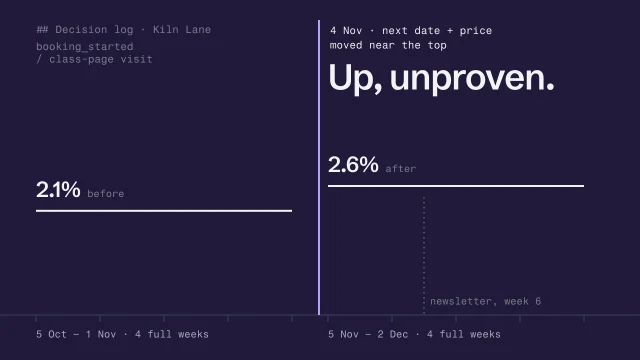
## Decision log
12026-11-04 Next date + price moved near the top
2Evidence 4 emails asking for dates; MT2 read
3Metric booking_started / class-page visit
4Before 4 weeks: 2.1% After 4 weeks: 2.6%
5Reading up, but a newsletter went out in week 6
6Decision keep; read again in February

A decision log entry from the lessons’ fictional studio. The figures are invented.

Where yours go: Organize your project, in Prepare.

Full transcript

After launch, everyone has ideas for the site. Make five of them in one week and the numbers will move, and you'll never know which change did it, or whether any of them did.

So change one thing at a time, set up so you can tell what happened. Start from evidence, not a hunch: a question the numbers answer, the monthly search read, something a customer said. Write the hypothesis down. Make the one change. Compare a window before with a window after. Then record what you decided, including when the answer is 'we don't know'.

GOV.UK's data community teaches a format worth borrowing: if, then, because. Here it is for the bakery. On a phone, the big Order ahead button sits below the queue photo. So: if the button moves above the photo on phones, then more regulars will order ahead, because they order on their phones in the morning and may not scroll that far. Then one primary metric, orders ahead per week, chosen before the change goes live. Choose the metric afterwards and you'll always find one that went up. The change reverses Design's photo-first rule on phones, so it goes in the decision notes with its date.

An A/B test splits visitors at random between two versions, and it's the strongest way to know. It also needs a lot of visitors. A sample-size calculator tells you how many. You enter how often visitors do the thing now and the smallest change you'd care about, and it gives the number each version needs. If a site really has that traffic, run the test in a proper testing tool and use its statistics.

Here's the arithmetic, with invented numbers. Say two thousand visits a month reach a page and two percent do the thing you want. Even to detect a jump from two to three percent, which is a big one, the standard sample-size formula at the usual settings asks for more than three thousand visitors on each version. Split two thousand a month in half and one test takes over three months, with the season changing underneath it. Put your own numbers into a calculator. For most small sites the honest answer is no test, and the bakery's plan is a before and after.

A before-and-after window is weaker evidence, so say so, because other things change at the same time: the season, a newsletter, a competitor. Keep the two windows the same length and made of full weeks. GOV.UK suggests running even a proper test for at least a full week, to cover differences between days. Never use launch week as your before, because it's never a normal week. The bakery went live on 21 October, so its before window is the four full weeks after launch week. The change goes live on 23 November, dated in the log, and the after window is the four full weeks from then.

Sometimes the after window looks like the before, or the difference is tiny next to the normal wobble from week to week. That's a result too. GOV.UK makes the point that a properly designed test teaches you something whether or not there's a clear winner. Write 'no clear effect'. Decide whether the change stays for some other reason, because it reads more clearly, say. Then stop. Don't go through ten other metrics looking for one that moved.

The bakery's result isn't in yet, and nobody should guess it. So here's a finished entry from a fictional pottery studio, with made-up figures. Customers kept emailing to ask when the next class ran, so the studio moved the next date and price near the top of its class page. The entry gives the evidence, the metric, the two windows, and then a reading in plain words that admits what else happened. A newsletter went out during the after window, so the rise is encouraging and unproven. The decision is to keep the change and look again later. Someone reading this next year can see what you changed and how sure you were.

One change, a hypothesis first, a fair before and after, and a log of how sure you are.

Is there enough traffic for a split test?
The arithmetic, with invented numbers
1Visits to the page about 2,000 a month
2Visitors who act now 2%
3Smallest lift wanted 2% to 3%
4Needed per version more than 3,000 visitors
5Split 1,000 / 1,000 over 3 months per test
6
7Verdict: no A/B test. Before and after instead.

Put your own numbers into a sample-size calculator. If the answer runs to months, compare before and after instead.

From the skill Change one thing and know whether it worked · fictional client

Before and after, without fooling yourself

Fools you

  • One week after vs one before
  • Launch week as the baseline
  • Two changes in one window

Holds up

  • Equal windows of full weeks
  • Last year's weeks, if seasonal
  • One change, dated in the log

Name the one number before the change goes live. Don’t go through ten other numbers afterwards looking for one that moved.

Hand the site over

Write down who looks after the site now, what each person changes, and where everything lives. Someone new should be able to pick it up from this page alone.

What you’ll make

Before you start
Everything from Improve.
You’ll learn
Accounts in the owner’s name, a routine she can follow, who to call, and a run-through on her own phone.
You’ll make
A handover page.
Worked example
The bakery’s handover: fictional example.
Used next
The owner, and whoever comes next.

Handover

Copy or download your answers before you leave this page.

Done when each kind of change has a named person, and the measurement plan, check routine, claims list and decision log are where the next person can find them.

More

Common Improve mistakes
  1. Looks like: A dashboard nobody has asked a question of

    Tracking first, questions later

    Write the owner’s questions before the tag goes in, then track the few events that answer them.

    Skill Decide what to measure before launch

  2. Looks like: An email address in a query string

    Sending personal data

    Look at what the thank-you page puts in its address, and rewrite or drop it before it’s sent.

    Skill Decide what to measure before launch

  3. Looks like: Average position 2.5

    Reading small numbers as big ones

    On a small site, read position as a rough hint, over months. Impressions and clicks are the measure.

    Skill Read Search Console without fooling yourself

  4. Looks like: One quiet week, and the homepage rewritten

    Chasing noise

    Check the same weeks last year before you touch anything. A drop right after a deploy is the one that points at you.

    Skill Read Search Console without fooling yourself

  5. Looks like: Checked once, on launch day

    A check with no trigger

    Put every check on a trigger: each deploy, each month, each kind of change. Name who runs it.

    Skill Set a post-launch check routine

  6. Looks like: New date, same words

    Fake freshness

    The date follows the work. New words first, then the new date.

    Skill Keep content and evidence true over time

  7. Looks like: Five changes in one week

    Changing everything at once

    One change at a time, a hypothesis written first, and equal windows of full weeks before and after.

    Skill Change one thing and know whether it worked

  8. Looks like: Ten metrics, and one of them went up

    Choosing the metric afterwards

    Name one main metric before the change goes live. “No clear effect” is a result: write it down.

    Skill Change one thing and know whether it worked

Where each finding goes back to

Each finding goes back to the one stage it reopens.

What the year turned upGoes back to
“kids clay workshop”: gap, no pageStructure and Research
“handmade mugs to buy”: misfitPlan
Next date and price moved upDesign and Build
A drop right after a deployBuild, then Test
The price list changesNo stage: it stays in Improve

Most updates reopen one stage, not all eight. Improving your website doesn’t mean starting over. Return to the stages that need attention.

From the Improve stage’s fictional studio, Kiln Lane.

Example project files

What Improve leaves in the project: a few short sections, so the next person can see what’s measured, what’s checked, what’s true and what was tried. From the lessons’ fictional studio; the decision log’s figures are invented.

## What we measure · the bakery (fictional)
1Action (brief): order bread ahead for pickup
2Q1 How many orders ahead come in each week?
3Q2 How many loaves sell out each week?
4Q3 How many calls ask about the hours?
5Q1 counted: order_started, order_sent (once received)
6Q2 the daily bread list, not analytics
7Q3 the owner's tally by the phone, not analytics
8Never sent names, phone numbers, anything typed in the form
9Read by the owner, first Monday of each month

From the skill Decide what to measure before launch · fictional client

## Check routine · the bakery (fictional)
1Each change speed budget, marker search, links
2Monthly search, real speed, a test order,
3 updates and renewals, names
4Hours/prices claims list + marker search
5New page the whole pre-send gate
6Layout/fonts/images every width + speed
7Owner edits the bread list and hours;
8 does the monthly read
9Nephew anything structural, and the
10 checks after it
11Agreed both, in writing
12Last run not yet; first monthly read 2 Nov

From the skill Set a post-launch check routine · fictional client

## Decision log
12026-11-04 Next date + price moved near the top
2Evidence 4 emails asking for dates; MT2 read
3Metric booking_started / class-page visit
4Before 4 weeks: 2.1% After 4 weeks: 2.6%
5Reading up, but a newsletter went out in week 6
6Decision keep; read again in February

From the skill Change one thing and know whether it worked · fictional client

Where yours go: Organize your project, in Prepare.

Full transcript

The usual handover is an email: the site’s live, the login details are below, call if there’s a problem. A year later the domain’s renewal notice goes to the builder’s inbox, and the owner hears her site is down from a customer.

So hand over a pack, not a password. The accounts, in the owner’s name. A routine she can follow without you. A page that says what to call someone for, and who. Then one run-through, with her hands on the phone.

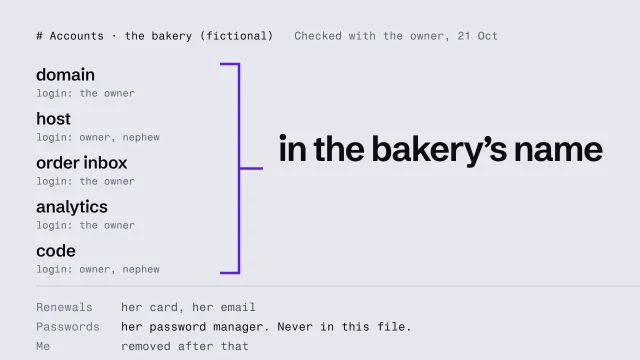
Start with the accounts. Everything the site depends on belongs to the business: the domain, the host, the inbox orders arrive in, the analytics and the code. Each one is in the bakery’s name, and the owner can log in to every one. If you’re the only one who can log in, the business doesn’t own its site. You do.

The bottom of the list says where renewals go: her card and her email, so no notice lands in your inbox. And notice what isn’t in the file: passwords. They live in her password manager. A document gets forwarded, printed and copied, and a password in it is out of anyone’s control. Then she logs in to each account, on her own phone, while you watch. A login nobody has tried isn’t a handover. Once she’s in everywhere, take yourself off, unless an agreement says you stay.

Next, the routine, written for her, not for you. Short lines, in her words, each one something she can do from her phone. Every morning, the bread list. When the hours or a price change, that one line, then a look at the page. On the first Monday, the month’s three numbers, a test order, and the renewal emails.

Make it a list she can tick. The ticks stay when she closes the page and comes back, and each list starts fresh when its time comes round: the morning list each day, the monthly list on the first. Here’s that tested: a tick on the second of November survives a reload, and the list is empty again on the first of December.

Then hand her the phone. She runs the morning routine herself while you watch, and you don’t touch it. Where she hesitates, the guide is wrong, so rewrite that line in her words, there and then.

Last, a short page on when to call, and who. At the bakery it’s the owner’s nephew, who builds websites: a new page, a change to the layout or the order form, or the site not loading. Everything in her routine, she does herself. If a builder stays on call, put it in a short agreement: what’s included, how fast they answer, and how either side ends it.

Accounts in her name, a routine she can tick, and a page that says who to call.

The lessons behind each section

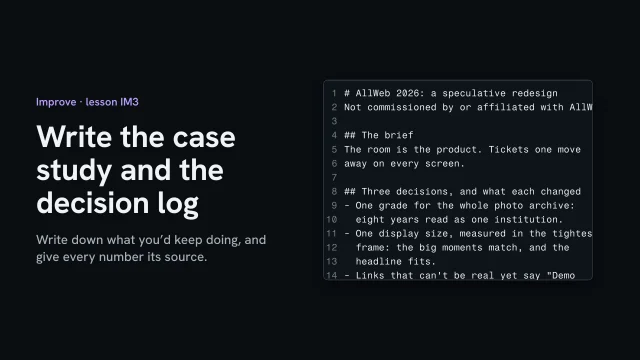
Write the case study and decision log

Write three to five decision-log entries: what you tried, the problem, what you learned and the rule you’re now testing. Then a one-page case study that says how the project came about, names a few decisions and gives every number its source.

What you’ll make

Before you start
  • Decision notes kept since the start of the project
  • The handover
  • Every phase’s records
You’ll learn
  • Writing a decision-log entry as Tried, Problem, Learned and Rule I'm testing
  • Drafting a one-page case study as decisions and improvements
  • Giving every number its tool, date and source, and saying when tools differ
You’ll make
Three to five decision-log entries and a one-page case study draft, each number with its source.
Worked example
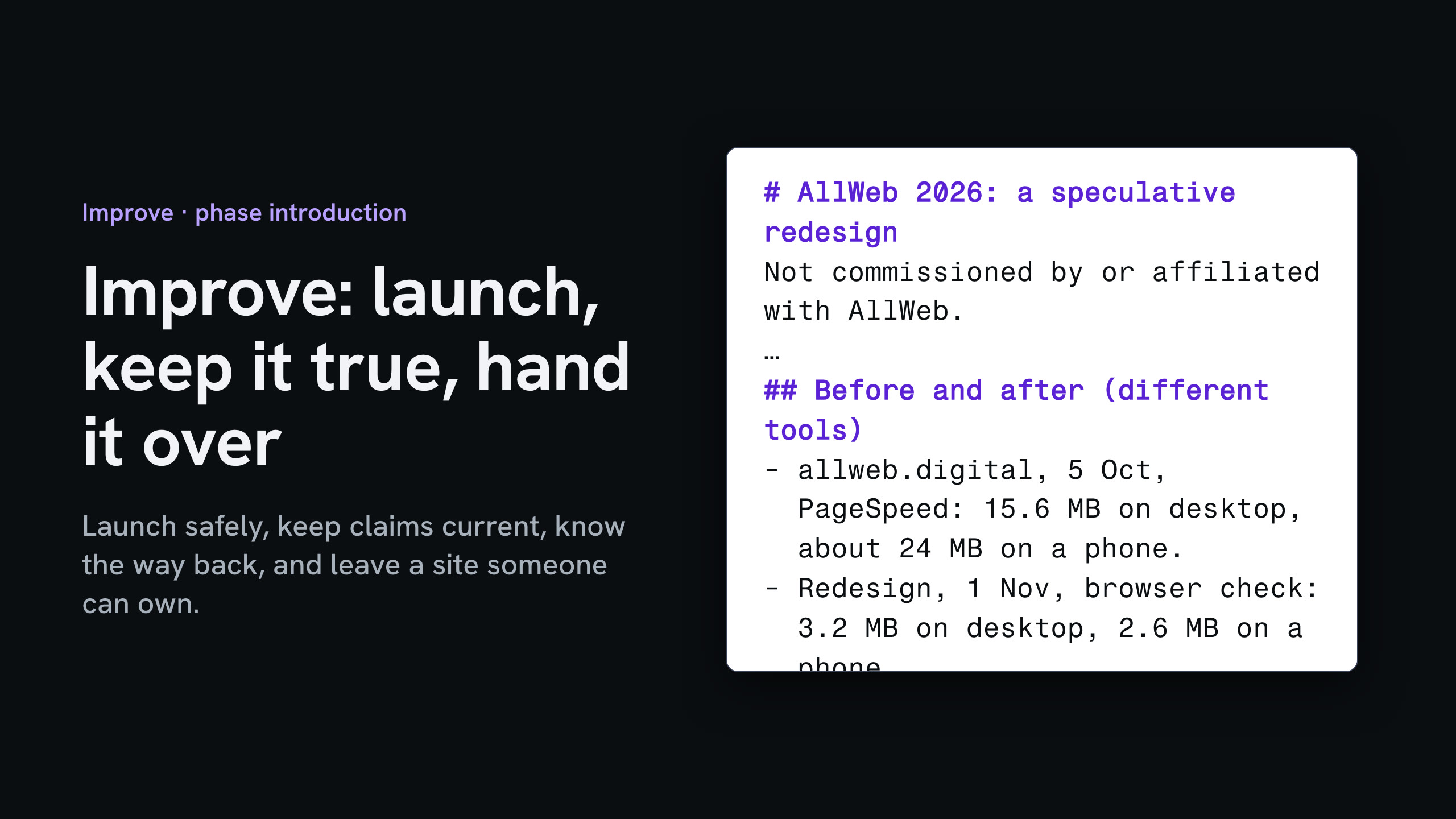
AllWeb's redesign: two real entries from 5 Oct (one grade for every photo; one display size, measured in the tightest frame) and a case study that says it was speculative, names three decisions, and compares page weight: allweb.digital 15.6 MB on desktop (PageSpeed, 5 Oct) and the redesign 3.2 MB (browser check, 1 Nov), labeled as different tools.
Check it
Each entry ends with a rule you're testing, and every number in the case study has its tool, date and source.
Used next
Your next project starts from these rules.

Decision log and case study

One decision-log entry

Case study

Copy or download your answers before you leave this page.

Write it as improvements, so the client would be glad to read it. When two numbers come from different tools, say so.

Done when each entry ends with a rule you’re testing and every number in the case study has its tool, date and source.

More

Full transcript

The project isn't finished until you've written down what you'd keep doing. Two short documents close it: the decision log, and the case study.

Each decision-log entry has four parts. What you tried. The problem you hit. What you learned. And the rule you're now testing. This one is from the redesign: one grade for every photo, not forty hand edits. Write the rule as a test, so the next project can prove it wrong. Here's a second: one display size, measured in the tightest frame. Write three to five while you still remember why.

Then the case study, on one page. Say first that it was speculative. The brief in a line, then three decisions and what each changed. Then before and after, each number with its tool and date. These two came from different tools, so the page says so. Write it as improvements, so AllWeb would be glad to read it.

Before anyone reads it, find every number in its source. The old page's weight, in the audit from the fifth of October. The redesign's, in the check from the first of November. And the nineteen demo links, in the link check.

Write down what you'd keep doing, and give every number in the story its source.