Improve · Aesthetary Original
Read Search Console without fooling yourself
You'll read search numbers as Google defines them, tie queries back to each page's job, and tell a real drop from noise.
In this skill
An average position from twelve impressions is a rumor.
Read queries against page jobs
- Filter the report to one page
- Read the queries that found it
- Compare them with the page's job
- Mark each: match, misfit or gap
Read queries against each page's job, treat small numbers as small, check last year first.
2 more scenes are in the video and the transcript.
The mechanics, from the source
These come from the organizations that make the tools. They teach how the tool works; the skill above is about when and why to use it.
Official resource · GoogleOfficial tool · Tool
Google Search ConsoleTool
The authoritative source for search performance after launch.
Transcript
Google will tell you, in its own numbers, how your site turns up in its search results. Those numbers are easy to read wrong, and then you go and change something that was fine.
Start with what the four numbers mean, because Google's definitions are narrower than they sound. An impression means a link to your site appeared on a page of results. It counts even if nobody scrolled down to it, though inside a carousel it has to be scrolled into view. A click is a click through to your site. Click-through rate is clicks divided by impressions. And position is the highest spot your site held on that page, averaged across impressions.
That average fools people most. Show up at position two once and position three once, and the report says two and a half. Now picture a new site with twelve impressions a month. The average will swing every week on a handful of searches. Google's own guide says not to focus too much on absolute position, and calls impressions and clicks the measure of success. On a small site, read position as a rough hint, over months.
The useful reading is page by page. Filter the report to one page and read the queries that brought it impressions. Then open the sitemap, where every page has one job and the search intent you planned it for. Do the queries fit the job? If a class page keeps appearing for people who want to buy pottery, the visitors are arriving at the wrong page, and the fix is in the copy or the sitemap. A ranking trick won't touch it.
Here's that reading for a fictional pottery studio's beginner class page. Two queries match its job exactly. One belongs to a shop the studio doesn't run, so check the page isn't promising something it doesn't sell. One is a gap: people looking for a children's workshop. That's a question for the owner. You don't add a page because a query appeared. And the list is never complete, because Google leaves out queries that are too rare or too private to report.
When the numbers fall, follow Google's guide to traffic drops, which is frank about noise. Small moves in position happen all the time, and Google advises against radical changes to a page that's already doing well. First, look at the same weeks last year: the dip may come around every year. Then find the pages that lost the most clicks. If a few big queries fell, check whether people stopped searching for them everywhere, which has nothing to do with your site. A drop straight after a change points at you: a page hidden from search, a broken page, a moved address.
One pattern has a specific cause. If impressions hold steady and clicks fall, people still see the result and choose something else. Google suggests looking at the page's title and snippet, or at whether another site now has a richer listing. That's one change you can make and then judge fairly.
How often? Google says there's no need to sign in every day. It emails you when it finds a new issue, and suggests checking around once a month, or when you change the site's content. Google also publishes its own walkthrough of the report, if you want to see where each number sits. Make it a monthly read, one page at a time, and end it by writing down what you'll do. 'Nothing this month' is a valid entry, and it's often the right one.
Read queries against each page's job, treat small numbers as small, check last year first.
Next 5
Everything in Improve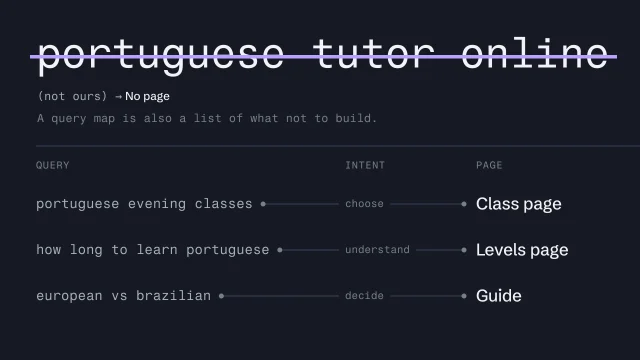 Let search intent shape the siteTurn what people search for into the pages a site needs.4 min video
 Build a sitemap where every page has one jobOrganize a site so each page has a clear purpose and a name visitors understand.4 min video
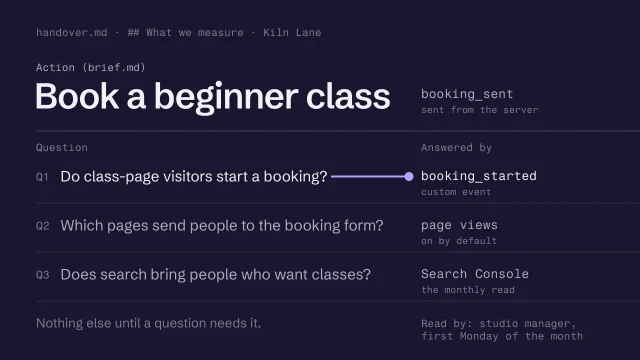 Decide what to measure before launchWrite the few questions the numbers must answer, and track only the events that answer them, with nothing personal.3 min video
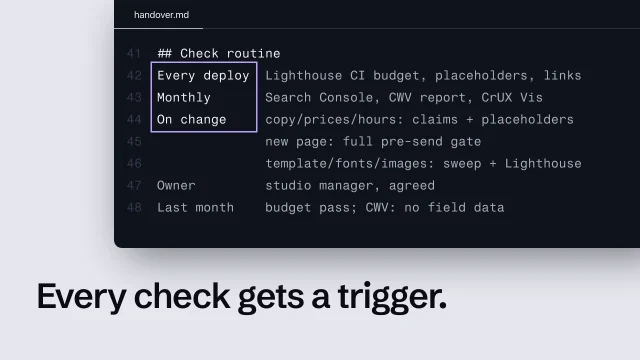 Set a post-launch check routinePut every launch check on a trigger, and know what to do when there's no field data.4 min video
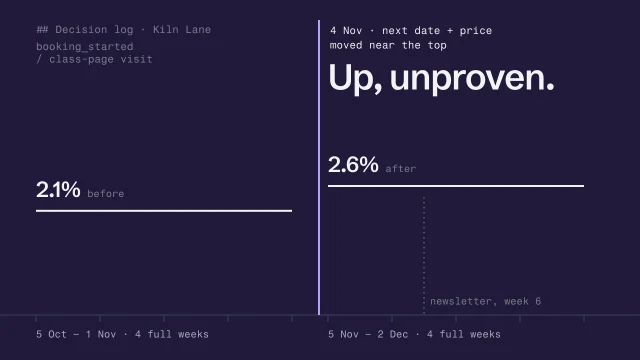 Change one thing and know whether it workedTurn evidence into one change, a fair before and after, and a decision log entry.4 min video